World First! The Tom Pulls TurboQuant w/MTP (and it Works!)
A world first! TurboQuant + MTP support from the same LLama.cpp! What a game changer!


The significance of this cannot be stressed enough - imagine not only getting MTP (multiple-token-prediction) on your LLM which almost doubles the speed , but then getting TurboQuant KV compression - allowing you to run VERY large contexts on minimal hardware!
Again we want to hugely thank TheTom for this specialized fork.
 TheTom
Background Supports.
- The supports are always the same you need the latest
cmake, the latestnvcc, the latest nvidia drivers, simply go over to the StudentLLM and work through it, the only difference is come back here for a different configuration and a MTP enabled model. - Because it references TheTom Turboquant fork of Llama.cpp it will automatically enable MTP - which he added to his fork last week! So this is the model that will both have MTP and Turboquant as of 2026-Jun-21.
- We had no idea this had occurred until Tom personally messaged me about it!
 thinkmeltprotonmail.com
If you have worked through the above guide you will have just taught yourself how to compile from source one of the most advanced LLM's in the world, and it's supports.
A Hot Config
- Please note you MUST use a MTP enabled MOE type model, we have gotten stunning results from Carnice-Qwen3.6.. so do support this guys work. Buy him a coffee!
wget https://huggingface.co/mudler/Carnice-Qwen3.6-MoE-35B-A3B-APEX-MTP-GGUF/blob/main/Carnice-Qwen3.6-MoE-35B-A3B-APEX-MTP-I-Balanced.gguf/usr/bin/llama-server --jinja \
-m /home/c/models/Carnice-Qwen3.6-MoE-35B-A3B-APEX-MTP-I-Balanced.gguf \
--host 192.168.1.3 \
--n-gpu-layers -1 \
--spec-type draft-mtp \
--spec-draft-n-max 2 \
--n-cpu-moe 30 \
--chat-template-kwargs '{"preserve_thinking":true}' \
-c 252144 \
--flash-attn 1 \
--context-shift \
--repeat-penalty 1.12 \
--cache-type-k turbo3 \
--cache-type-v turbo4 \The results were shocking. We had it go over a 38K large multiple level asteroid game. We were used to our localLLM taking a good half hour to produce. No. Nuts! It was done in a few minutes.
Some INSANE ingest/production Numbers. Check this out.
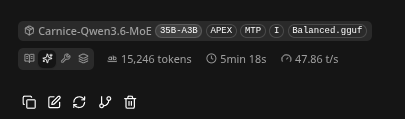
- This is not 'high-end' gear - this is just a 4080 on a Ryzen 9 12-core. 128 GB RAM / 16 GB VRAM.
- Please note you will need to adjust your
--n-cpu-moe 30to something larger or smaller, if you are doing small contexts load your GPU like 90%. I use this configuration to utilize about 12GB of my 16GB GPU. It allows for very large contexts because of kv_cache compression and still gives whopping fast speeds, like FAST. - If I was doing super-large contexts I can adjust that value UP, and load most of the model to the CPU. It is a speed/size trade off.
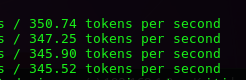
Next we ran bench-loop on the whole setup...
benchloop run --endpoint http://192.168.1.3:8080 --provider openai_compat --model Carnice-Qwen3.6-MoE-35B-A3B-APEX-MTP-I-Balanced.ggufWe modified our run configuration so it used 15.7GB of the 16 GB card. The idea is the benchmark will probably run inside the last 1 GB, and it was CRUSHING through it. Our benchmark config... --n-cpu-moe 24
/usr/bin/llama-server --jinja \
-m /home/c/models/Carnice-Qwen3.6-MoE-35B-A3B-APEX-MTP-I-Balanced.gguf  \
--host 192.168.1.3 \
--n-gpu-layers -1 \
--spec-type draft-mtp \
--spec-draft-n-max 2 \
--n-cpu-moe 24 \
--chat-template-kwargs '{"preserve_thinking":true}' \
-c 252144 \
--flash-attn 1 \
--context-shift \
--repeat-penalty 1.12 \
--cache-type-k turbo3 \
--cache-type-v turbo4 \
It was just sailing through the benchmark, and we were excited to see what results were about to pour in. We had never seen ingest over really about 150, and never saw much above 27. We effectively saw it doubled.

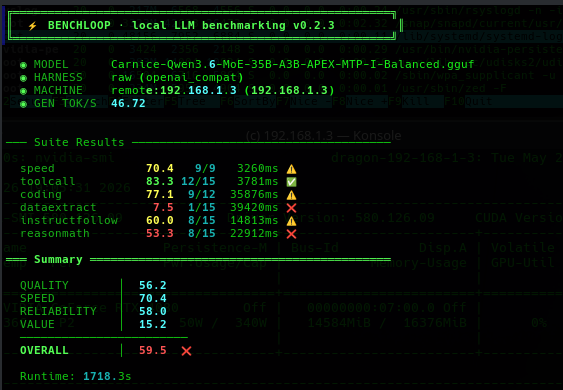
It gave VERY good results. For some reason dataextract either gets a 15/15 or a 1 with these models, to tweak. It should be noted that potentially we should disable our MCP agents before benchmarking as it adds unnecessary overhead.
We noticed that we gave it almost no-cache and it was failing at one point with an error of:
W slot update_slots: id 0 | task 32013 | forcing full prompt re-processing due to lack of cache data (likely due to SWA or hybrid/recurrent memory, see https://github.com/ggml-org/llama.cpWe backed off our model and followed recommendations by adjusting the --n-cpu-moe 26 and adding --swa-full Our next run configuration is as follows, which loaded the GPU to 14.5GB out of 16GB.
/usr/bin/llama-server --jinja \
-m /home/c/models/Carnice-Qwen3.6-MoE-35B-A3B-APEX-MTP-I-Balanced.gguf  \
--host 192.168.1.3 \
--n-gpu-layers -1 \
--spec-type draft-mtp \
--spec-draft-n-max 2 \
--n-cpu-moe 29 \
--chat-template-kwargs '{"preserve_thinking":true}' \
-c 252144 \
--swa-full \
--flash-attn 1 \
--repeat-penalty 1.12 \
--cache-type-k turbo3 \
--cache-type-v turbo4 \
It should be noted that our Tokens/s dropped from 58 to about 45 ish on various things, and we are currently studying this for better results. We stopped at this point because irrespective of the bench the results are a game changer!
Power Tools. MCP Agents.
Once you get this highly powerful LLM working you can increase it's ability MASSIVELY by adding MCP agents. Here are complete opensource walk throughs of a pile of MCP agents to get you started. If you are trying to learn - start on #1 the Calculator and when you get the hang of it work up!
thinkmeltprotonmail.com
Process-Manger MCP Agent is Exceptionally Powerful
One tool stood out in particular the Process Manager MCP tool. Using it you can have your localLLM pick up over multiple prompts, break a job up into multiple tasks, give you 'code-drops' of entire code bases.
thinkmeltprotonmail.com
LLMQP - Get your houseLLM coding all night
Once you have the hang of a bunch of coding agents, you can use this MCP agent to get your LLM working through dozens of prompts - saving it's work to the Process Manager.
thinkmeltprotonmail.com
Conclusion
Even though it seemed that bench-loop didn't really give this configuration a very high rating, we were extremely sold on how well it performed from our own anecdotal observations. It not just a work horse now, it is a endurance workhorse. We were very used to having our houseLLM take up to 1.5 hours to produce anything significant and it was like the dishes - you set it and come back and it produced something useful. Now if you were around pre-LLM days this would take weeks to do manually, and you could spend days looking for code examples. So this is fast compared to hand-coding. And it's free. You do not have to pay for it, and it's real benefit comes in when you learn how to leverage your localLLM to code for you all night! Yes it will not replace a SOTA commerical model, but it's yours, and ownership is it's own ability, it also shows you know how to build, promote, and maintain your own LLM that empowers you that you are competent in using them!