PowerChest home Agent Agents MCP Tools to Put your HouseLLM into Turbo. MCP TOOLS 1-9++
Downloads Page for all your MCP tooling needs!


We have compiled a collection of very easy back MCP tools for all your agentic houseLLM needs!
- If you need to know how to use these a dedicated page for each one will guide you through getting them to work!
- They are simple - they are just a docker container that opens up a port. Your houseLLM will query it for it's work. You register it simply by 'add MCP server' That's it!
- PLEASE NOTE YOUR RUN CONFIGURATION MAY WORK FASTER WITH
--webui-mcp-proxyThen if you do use it click it on for each MCP Agent you use.
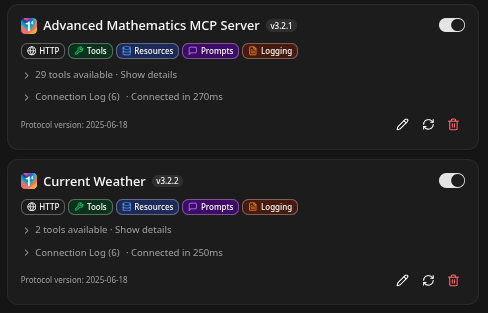
Scientific Calculator MCP Docker Agent
- This will enable your houseLLM to do incredibly powerful math - then verify it's work! Seriously.
docker pull cnmcdee/mcp_calculator:latest
docker run -d --name mcp-calculator --restart unless-stopped -e "FLASH_ENV=production" -p 0.0.0.0:5000:5000 cnmcdee/mcp_calculator:latest- Because it's CORS http it works! Add it to your MCP Tooling easily via:
http://192.168.1.<YOURIP>:5000/mcp- If you would like to work through the source code and learn how these are built - this is a great starting point:
Agentic Server Primer: Llama.cpp MCP Lesson 1: A Calculator.
Agentic Server Primers: Llama.cpp MCP Lession 1: A Calculator
 thinkmeltprotonmail.com
All MCP Agents Are Great in a Docker Container.
- If you would like to learn the powerful and easy ways to dockerize your MCP agents we have a full walk-through guide!
Agentic Server Primer: Llama.cpp MCP Lesson 2: Dockerization.
Agentic Server Primer: Llama.cpp MCP Lesson 2: Dockerization.
thinkmeltprotonmail.com
Python Docker MCP Docker Agent
- With this tool typically not only will your LLM generate python code - it will then send it to testing to this Python MCP. This is a game changer because LLM's will always make a few mistakes. Allowing your LLM to check and recompile it's code is almost surreal the first time you witness it.
docker pull cnmcdee/mcp-python:latest
docker run -d --name mcp-python --restart unless-stopped -e "FLASH_ENV=production" -p 0.0.0.0:5001:5001 cnmcdee/mcp-python:latest- Because it's CORS HTTP enabled it works! Add it to your MCP Tooling easily via:
http://192.168.1.<YOUR IP>:5001/mcp- You simply change your IP address for each agent your add: 5002, 5003.. so on.
- If you would like to learn how this MCP is coded and dockerized just work through this guide.
Agentic Server Primer: Llama.cpp MCP Lesson 3: Adding Python Tooling Capability To your HouseLLM.
Agentic Server Primer: Llama.cpp MCP Lesson 3: Python
thinkmeltprotonmail.com
Weather API Example MCP Docker Agent
- This fully complementary MCP tool will enable your LLM to look up weather anywhere in the world!
- This is a great way to learn API integration with the world. where you can learn the fundamentals of how your localLLM can make MCP calls to the outside world!
docker pull docker.io/cnmcdee/mcp-weather:latest
docker run -d --name mcp-weather --restart unless-stopped -e "FLASH_ENV=production" -p 0.0.0.0:5002:5002 cnmcdee/mcp-weather:latest
Agentic Server Primer: Llama.cpp MCP Lesson 4: Weather Polling via api.weather.gov
Agentic Server Primer: Llama.cpp MCP Lesson 4: Weather Polling via api.weather.gov
thinkmeltprotonmail.com
Javascript Enabled MCP Agent
- This uses a Python API to pipe javascript. Very powerful when you want to code javascript for your html projects and your LLM wants to verify it's work!
docker pull docker.io/cnmcdee/mcp-javascript:latest
docker run -d --name mcp-javascript --restart unless-stopped -e "FLASH_ENV=production" -p 0.0.0.0:5003:5003 cnmcdee/mcp-javascript:latest
Agentic Server Primer: Llama.cpp MCP Lesson 5: Adding javascript via a Python api plugin.
We go through a full working example of creating your own MCP tools.
thinkmeltprotonmail.com
Mysql Enabled MCP Agentic Agent
- This will let your LLM communicate with it's own database! It can be very interesting watching it create tables, joins, merges all on it's own! It is literally like having a mysql employee at your beck.
- Please note you will probably need to do this one manually so it can make it's connection to the running mysql instance.
docker pull docker.io/cnmcdee/mcp-msyql:latest
docker run -d --name mcp-mysql --restart unless-stopped -e "FLASH_ENV=production" -p 0.0.0.0:5004:5004 cnmcdee/mcp-mysql:latest
Agentic Server Primer: Llama.cpp MCP Lesson 6: Adding mysql Database Docker Toolsets.
We give our LLM it’s own Database to play with!
thinkmeltprotonmail.com
SuperPython Enabled MCP Agent
- This is a MUCH beefier python with numpy, beautifulsoup, requests, whatever you want to put inside your python environment. Use this when your LLM is creating web enabled tools and wants to test them!
- Again the process is near identical so we reference the basic python MCP docker tutorial from above..
To quickly pull and run this locally:
docker pull docker.io/cnmcdee/mcp-super-python:latest
docker run -d --name mcp-super-python --restart unless-stopped -e "FLASH_ENV=production" -p 0.0.0.0:5007:5007 cnmcdee/mcp-super-python:latestProcess Manager with Code Drop and Web Request Agent
- This is a powerhouse tool. By allowing your LLM to save its work, gift it to you with a 'code drop' resume a task, break it down into jobs and record it's own code snippets you can do production level research from a houseLLM at much lower cost!
docker pull docker.io/cnmcdee/mcp-process-manager:latest
docker run -d --name mcp-process-manager --restart unless-stopped -e "FLASH_ENV=production" -p 0.0.0.0:5008:5008 cnmcdee/mcp-process-manager:latest
Agentic Server Primer: Llama.cpp MCP Lesson 8: Process Manager Web Enabled Research Assistant w/ Code Drop.
Agentic Server Primer: Llama.cpp MCP Lesson 8: Process Manager Web Enabled Research Assistant
thinkmeltprotonmail.com
Docker Orchestrator
- This powerful MCP agent will enable your tool-enabled MCP agent to create, stand up and test it's own docker images and containers!
- NOTE because this is designed to remote into a server via it's SSH tunnel you will need to set some variables:
docker pull docker.io/cnmcdee/mcp-docker-orchestrator:latest

docker run -d \
  --name mcp-docker-orchestrator \
  --restart unless-stopped \
  -p 0.0.0.0:5010:5010 \
  -e "FLASH_ENV=production" \
  -e ENV_SERVER="${ENV_SERVER}" \
  -e ENV_USER="${ENV_USER}" \
  -e ENV_PASSWORD="${ENV_PASSWORD:-}" \
  -e ENV_PORT="${ENV_PORT:-22}" \
  cnmcdee/mcp-docker-orchestrator
Agentic Server Primer: Llama.cpp MCP Lesson 9: Docker Orchestrator
In this guide we go over letting your llm manage and create it’s own docker images, stand up it’s own containers after writing it’s code. It uses a special docker-compose tool we built for it.
thinkmeltprotonmail.com
mcp-coder (Cuda Enabled Docker Container)
- This is a powerful 'developmental' type container for those that need a safe environment for developing and compiling new versions of Llama.cpp, or doing cuda type compilation.
docker pull cnmcdee/mcp-coder:latest

# Start container
docker run -d \
--name $CONTAINER_NAME \
--restart unless-stopped \
-p 5011:5011 \
-v ~/mcp-workspace:/work_path \
--env PYTHONUNBUFFERED=1 \
cnmcdee/mcp-coder:latest
Agentic Server Primer: Llama.cpp MCP Lesson 10: mcp-coder (Cuda Version)
We build a MCP Coding Agent that will allow your LLM to specifically work on and debug it’s own code with nvcc, or really any language!
thinkmeltprotonmail.com
LLMQP - Power Prompt Manager for your LLM!
- This is a powerhouse tool. With it you can have your LLM coding all night!
- Assign a series of prompts, and by combining it with the Process Manager you can run dozens of prompts.
docker pull docker.io/cnmcdee/llmqueue:latest
docker run -d --name mcp-llmqueue --restart unless-stopped -p 0.0.0.0:5012:5012 cnmcdee/llmqueue:latest
LLMQP Drops! A New Queue Dispatcher. Let your LLM CODE ALL NIGHT.
LLM Queue Dispatcher. A Powerful Harness Drop will queue your localLLM all night and keep it working!
thinkmeltprotonmail.com