Agentic Server Primer: Llama.cpp MCP Lesson 9: Docker Orchestrator
In this guide we go over letting your llm manage and create it's own docker images, stand up it's own containers after writing it's code. It uses a special docker-compose tool we built for it.


In Lessons 1-8 we covered everything from a scientific calculator, to python compilation, and today we will be looking at rolling your own docker orchestrator.
If you just need to pull and run this docker image:
docker pull docker.io/cnmcdee/mcp-docker-orchestrator:latest

docker run -d \
  --name mcp-docker-orchestrator \
  --restart unless-stopped \
  -p 0.0.0.0:5010:5010 \
  -e "FLASH_ENV=production" \
  -e ENV_SERVER="${ENV_SERVER}" \
  -e ENV_USER="${ENV_USER}" \
  -e ENV_PASSWORD="${ENV_PASSWORD:-}" \
  -e ENV_PORT="${ENV_PORT:-22}" \
cnmcdee/mcp-docker-orchestrator- This is very powerful, not only can your LLM write and test it's own code using the other MCP tools, it can then successfully stand up the code into a running container.
- We noted there was some challenges getting the LLM to see the docker endpoint, and or it took some tries. it would suggest that the number of training tokens that LLM's receive in this field may be sparse.
Let's get started!
A. Prerequisites
To understand all the moving parts we will preface this with all the commands that this MCP agent is capable of. Because it requires careful prompting to work effectively, here is it's tool list (Written by Qwen 3.6)
Here are the Docker tools available to you, organized by functionality:
🖼️ Image Management
docker_images– List all Docker images present on the remote serverdocker_pull– Pull an image (or specific tag) from a registry to the remote serverdocker_build– Build a Docker image from aDockerfilein a specified context directory
📦 Container Management
docker_ps– List running containers (setall=Trueto include stopped ones)docker_run– Create & start a new container (supports port mappings, env vars, volumes, custom commands)docker_stop– Stop a running containerdocker_start– Start a stopped containerdocker_restart– Restart a containerdocker_rm– Remove containers (useforce=Trueto remove running ones)docker_logs– Fetch logs from a container (supportstailline limit andfollowstreaming)
📝 Docker Compose Management
docker_compose_up– Start services defined in adocker-compose.ymldocker_compose_down– Stop & remove containers, networks, and optionally named volumesdocker_compose_build– Build or rebuild services defined in a compose filedocker_compose_ps– List containers for a specific compose projectdocker_compose_logs– View logs from compose services (supports filtering by service & follow mode)docker_compose_command– Execute any arbitrarydocker composesubcommand with custom argumentsdocker_compose_deploy– Fully deploy an app by uploadingDockerfile,requirements.txt,app.py, anddocker-compose.ymlto~/docker/{project_name}, then building & running it
💡 Note: All Docker tools execute commands on the remote server configured via your global SSH session.
A. Docker Controller Model
The docker controller model can seem complex - and we will illustrate the moving parts.
- User enters prompt to the llm web face at their end point (192.168.1.4:8080), that becomes a json object which is inferenced by the LLM. It examines its available tool list and uses the MCP docker tool. The MCP docker tool is holding a ssh via a paramiko pipe to the working server. This could theoretically be docker-in-docker but for simplicity sake we just gave it it's own server. If you have a spare 4 core laptop working that is a perfect candidate for this.
- The llm recursively attempts the tools, and it will received json object feedback via the MCP agent to it's own progress
- The end-user can watch the docker process and docker image lists to see if it is successfully building images and or standing up containers.
<Long pre-prompt of building software>
When you are done building this software use the docker tool to create a Dockerfile, a requirements.txt a app.py and a docker-compose.yml. Build an image and verify it's there, then stand up that image on port 7001.  Finally using the web requests tool make sure it is running at the server point of 192.168.1.4:7001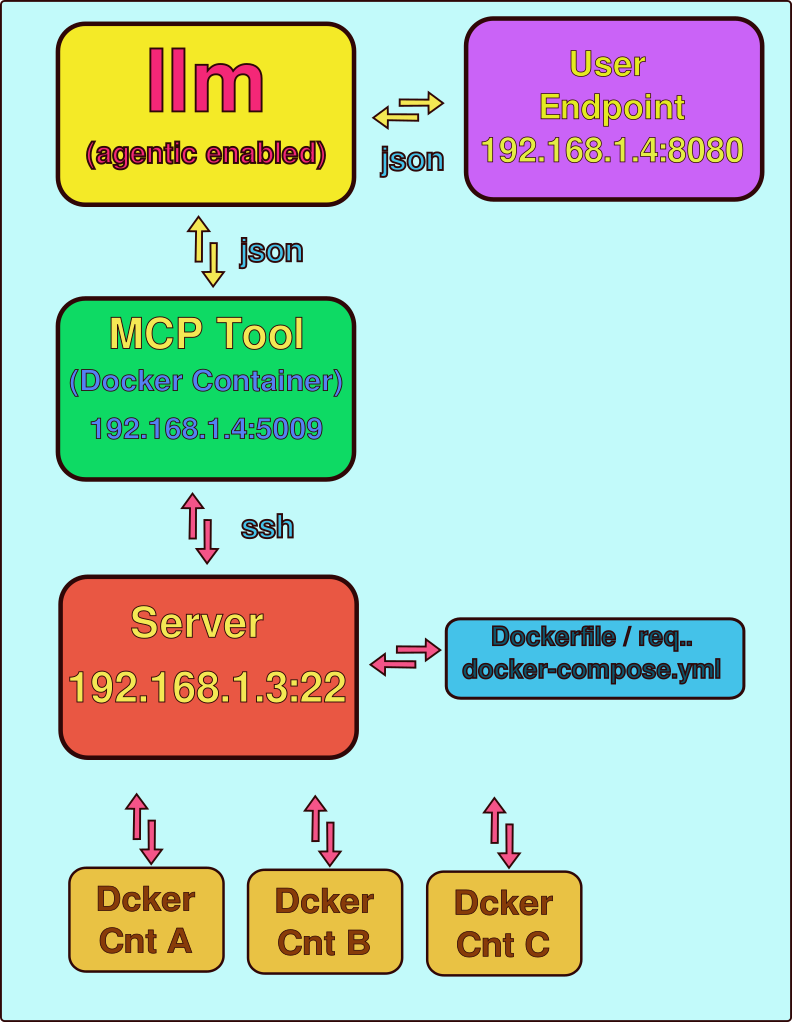
Setting the Environment
- Because one docker container needs to ssh to remove one layer of complexity you can have it work without a password during the testing phase:
ssh-keygen   # will make a password
ssh-copy-id you@192.168.1.3 # will allow passwordless access.- Please note we are also approaching production - so you will need to pass environment variables that hold the ENV for the remote server. For instance:
ENV_PASSWORD = os.environ.get('ENV_PASSWORD')
ENV_SERVER = os.environ.get('ENV_SERVER')
ENV_USER = os.environ.get('ENV_USER')
Thus an example run command for the python could be a script that is simply:
export ENV_PASSWORD='your docker server password'
export ENV_SERVER='192.168.1.4' # Or wherever it lives
export ENV_USER='user'
python3 mcp_agent.py  #Inside it uses os.environ.get to retreive
Full Code
from fastmcp import FastMCP
from starlette.middleware import Middleware
from starlette.middleware.cors import CORSMiddleware
import uvicorn
import paramiko
import threading
import os
import traceback
import textwrap
import yaml

# ── Global SSH Session Manager ─────────────────────────────────────────────
ssh_sessions = {}
session_lock = threading.Lock()
ENV_PASSWORD = os.environ.get('ENV_PASSWORD')
ENV_SERVER = os.environ.get('ENV_SERVER')
ENV_USER = os.environ.get('ENV_USER')
ENV_PORT = 22


def get_or_create_ssh_session(server: str, username: str, password: str = None, key_path: str = None, port: int = 22) -> str:
    """Create or retrieve a persistent SSH session to a remote server.

    Maintains a thread-safe pool of Paramiko SSHClient connections keyed by
    ``server:port:username``. This avoids the overhead of establishing a new
    connection for every command and supports keep-alive packets for long-lived
    sessions.

    Args:
        server: Hostname or IP address of the remote server.
        username: SSH login username.
        password: Password for authentication. Mutually exclusive with ``key_path``.
        key_path: Absolute path to an SSH private key file on the local machine.
        port: SSH port number.

    Returns:
        str: Unique session identifier in the format ``f"{server}:{port}:{username}"``.

    Note:
        This is an internal function used by the global SSH session manager and
        the Docker command helpers.
    """
    session_id = f"{server}:{port}:{username}"
    with session_lock:
        if session_id not in ssh_sessions:
            client = paramiko.SSHClient()
            client.set_missing_host_key_policy(paramiko.AutoAddPolicy())
            connect_kwargs = {
                'hostname': server, 'port': port, 'username': username,
                'timeout': 10, 'allow_agent': False, 'look_for_keys': False
            }
            if password:
                connect_kwargs['password'] = password
            elif key_path:
                connect_kwargs['key_filename'] = key_path
            client.connect(**connect_kwargs)
            client.get_transport().set_keepalive(15)  # Keep connection alive
            ssh_sessions[session_id] = client
        return session_id
def close_ssh_session(session_id: str) -> None:
    """Close and remove a persistent SSH session from the global cache.

    Args:
        session_id: The session identifier returned by ``get_or_create_ssh_session``.

    Note:
        This is an internal function for explicit resource cleanup.
    """
    with session_lock:
        if session_id in ssh_sessions:
            ssh_sessions[session_id].close()
            del ssh_sessions[session_id]
def ssh_execute(session_id: str, command: str) -> str:
    """Execute a shell command on the remote server using a persistent SSH session.

    Args:
        session_id: The session identifier returned by ``get_or_create_ssh_session``.
        command: The shell command to execute (may contain pipes, redirection, etc.).

    Returns:
        str: Combined stdout and stderr output prefixed with labels, or an error
             message if the session is unavailable or execution fails.
    """
    with session_lock:
        client = ssh_sessions.get(session_id)
        if not client:
            return "Error: Session not found."
        try:
            stdin, stdout, stderr = client.exec_command(command)
            output = stdout.read().decode()
            errors = stderr.read().decode()
            return f"stdout:\n{output}\nstderr:\n{errors}"
        except Exception as e:
            return f"Error executing command: {str(e)}"
# ── SFTP Helper Functions (added for file deployment) ───────────────────────
def get_sftp_client(session_id: str):
    """Get an SFTP client from the persistent SSH session."""
    with session_lock:
        client = ssh_sessions.get(session_id)
        if not client:
            return None
        try:
            return client.open_sftp()
        except Exception as e:
            print("Error: {e}")
            return None
def _get_ssh_stdout(result: str) -> str:
    """Safely extract only the clean stdout from ssh_execute output."""
    if not result:
        return ""
    if "stdout:" in result:
        # Take everything after "stdout:" and before "stderr:"
        after_stdout = result.split("stdout:", 1)[1]
        clean = after_stdout.split("stderr:", 1)[0]
        return clean.strip()
    # Fallback
    return result.strip()
def upload_file_content(session_id: str, content: any, remote_path: str) -> bool:
    """Upload string content (or dict, auto-serialized to YAML for .yml/.yaml files)
    as a file to the remote server via SFTP using absolute paths only.
    Correctly parses the formatted output of ssh_execute so paths are never corrupted.
    """
    sftp = get_sftp_client(session_id)
    if not sftp:
        print("Error: Could not obtain SFTP client.")
        return False

    try:
        print(f"[DEBUG] Original remote_path: {remote_path}")

        # Resolve absolute home directory
        home_result = ssh_execute(session_id, "echo -n $HOME")
        home_dir = _get_ssh_stdout(home_result)

        # Safety fallback
        if not home_dir or len(home_dir) < 3:
            whoami_result = ssh_execute(session_id, "whoami")
            username = _get_ssh_stdout(whoami_result)
            home_dir = f"/home/{username}"
            print(f"[DEBUG] Home directory resolved to: {home_dir}")

        # Convert ~/... to absolute path
        if remote_path.startswith("~/"):
            absolute_path = home_dir + remote_path[1:]
        else:
            absolute_path = remote_path

        print(f"[DEBUG] Absolute remote path: {absolute_path}")

        # Ensure parent directory exists
        remote_dir = os.path.dirname(absolute_path)
        if remote_dir:
            mkdir_result = ssh_execute(session_id, f"mkdir -p {remote_dir}")
            print(f"[DEBUG] mkdir -p result: {_get_ssh_stdout(mkdir_result) or '<no output - success>'}")

        # Normalize content to string (YAML for compose files, plain str otherwise)
        if isinstance(content, dict):
            if absolute_path.lower().endswith(('.yml', '.yaml')):
                print("[DEBUG] Content is dict; serializing to YAML for docker-compose.yml")
                content_str = yaml.dump(
                    content,
                    default_flow_style=False,
                    sort_keys=False,
                    allow_unicode=True,
                    width=120
                )
            else:
                # Fallback for non-YAML files (rare)
                import json
                content_str = json.dumps(content, indent=2)
        elif isinstance(content, str):
            content_str = content
        else:
            # Graceful fallback for other types
            print(f"[WARNING] Unexpected content type {type(content).__name__}; converting to str")
            content_str = str(content)

        # Encode to bytes for Paramiko
        content_bytes = content_str.encode('utf-8')

        print(f"[DEBUG] Attempting upload to: {absolute_path} ({len(content_bytes)} bytes)")

        # Upload in binary mode
        with sftp.file(absolute_path, 'wb', 0o644) as f:
            f.write(content_bytes)

        print(f"[SUCCESS] File uploaded successfully to {absolute_path}")
        return True

    except Exception as e:
        print(f"[ERROR] Upload failed for original path: {remote_path}")
        print(f"[ERROR] Exception type: {type(e).__name__}")
        print(f"[ERROR] Exception message: {e}")
        traceback.print_exc()
        return False
def ensure_remote_directory(session_id: str, remote_dir: str) -> str:
    """Ensure a remote directory exists using mkdir -p."""
    cmd = f"mkdir -p {remote_dir}"
    return ssh_execute(session_id, cmd)
# ── Auto-establish SSH Connection on Startup ───────────────────────────────
GLOBAL_SSH_SESSION_ID = None

if ENV_SERVER and ENV_USER:
    try:
        GLOBAL_SSH_SESSION_ID = get_or_create_ssh_session(
            server=ENV_SERVER,
            username=ENV_USER,
            password=ENV_PASSWORD,
            port=ENV_PORT
        )
        if GLOBAL_SSH_SESSION_ID:
            print(f"✓ SSH connection established to {ENV_SERVER} as {ENV_USER} {GLOBAL_SSH_SESSION_ID}")
        else:
            print("Failed GLOBAL_SSH_SESSION_ID - Exiting..")
            exit(-1)
    except Exception as e:
        print(f"✗ Failed to establish SSH connection: {e}")
        GLOBAL_SSH_SESSION_ID = None
else:
    print("⚠ Warning: ENV_SERVER and/or ENV_USER environment variables are not set.")
def _run_docker_command(cmd: str) -> str:
    """Execute a Docker command on the remote server via the global SSH session.

    All Docker-related tools delegate to this internal helper.

    Args:
        cmd: The complete Docker (or docker-compose) command string to execute.

    Returns:
        str: Command output (stdout + stderr) or an error message if the global
             SSH session is unavailable.

    Note:
        Requires the global SSH session established at module import time using
        the ``ENV_SERVER``, ``ENV_USER``, and optional ``ENV_PASSWORD`` environment
        variables.
    """
    if GLOBAL_SSH_SESSION_ID is None:
        return "Error: SSH session is not available. Check environment variables and connectivity."
    return ssh_execute(GLOBAL_SSH_SESSION_ID, cmd)

# ── FastMCP Server Setup ───────────────────────────────────────────────────
mcp = FastMCP(name="Docker Manager")
@mcp.tool
def docker_ps(all: bool = False) -> str:
    """List running (and optionally all) containers on the remote Docker host.

    Equivalent to ``docker ps`` or ``docker ps -a``.

    Args:
        all: If True, include stopped containers (adds the ``-a`` flag).

    Returns:
        str: Formatted output of the ``docker ps`` command.

    Note:
        All commands execute on the remote server defined by the global SSH session.
    """
    cmd = "docker ps -a" if all else "docker ps"
    return _run_docker_command(cmd)
@mcp.tool
def docker_images() -> str:
    """List all Docker images present on the remote server.

    Equivalent to ``docker images``.

    Returns:
        str: Formatted output of the ``docker images`` command.

    Note:
        All commands execute on the remote server defined by the global SSH session.
    """
    return _run_docker_command("docker images")
@mcp.tool
def docker_pull(image_name: str) -> str:
    """Pull a Docker image (or image:tag) from a registry to the remote server.

    Equivalent to ``docker pull <image_name>``.

    Args:
        image_name: Name of the image to pull (e.g., "nginx:latest" or "myrepo/app").

    Returns:
        str: Output of the pull operation (progress and status messages).

    Note:
        All commands execute on the remote server defined by the global SSH session.
    """
    return _run_docker_command(f"docker pull {image_name}")
@mcp.tool
def docker_build(context_path: str, tag: str = None, dockerfile: str = "Dockerfile",no_cache: bool = False) -> str:
    """Build a Docker image from a Dockerfile located on the remote server.

    Equivalent to ``docker build [OPTIONS] <context_path>``.

    Args:
        context_path: Build context directory on the remote server (absolute or relative path).
        tag: Tag to apply to the built image (e.g., "myapp:v1").
        dockerfile: Name of the Dockerfile within the context (defaults to "Dockerfile").
        no_cache: If True, do not use cache when building the image.

    Returns:
        str: Build output including progress and final image ID.

    Note:
        All commands execute on the remote server defined by the global SSH session.
    """
    cmd = ["docker", "build"]
    if tag:
        cmd.extend(["-t", tag])
    if dockerfile != "Dockerfile":
        cmd.extend(["-f", dockerfile])
    if no_cache:
        cmd.append("--no-cache")
    cmd.append(context_path)
    return _run_docker_command(" ".join(cmd))
@mcp.tool
def docker_run(image: str, name: str = None, detach: bool = True, ports: str = None,env: str = None, volumes: str = None, command: str = "") -> str:
    """Create and start a new container from the specified image on the remote server.

    Equivalent to ``docker run [OPTIONS] IMAGE [COMMAND]``.

    Args:
        image: Docker image to run (e.g., "nginx:latest").
        name: Assign a name to the container.
        detach: Run container in background (adds ``-d`` flag). Defaults to True.
        ports: Port mapping(s) in the format "HOST_PORT:CONTAINER_PORT" (e.g., "8080:80").
        env: Environment variable(s) in the format "KEY=value".
        volumes: Volume mount(s) in the format "HOST_PATH:CONTAINER_PATH".
        command: Optional command and arguments to override the image's default CMD.

    Returns:
        str: Container ID (if detached) or full command output.

    Note:
        All commands execute on the remote server defined by the global SSH session.
    """
    cmd = ["docker", "run"]
    if detach:
        cmd.append("-d")
    if name:
        cmd.extend(["--name", name])
    if ports:
        cmd.extend(["-p", ports])
    if env:
        cmd.extend(["-e", env])
    if volumes:
        cmd.extend(["-v", volumes])
    cmd.append(image)
    if command:
        cmd.append(command)
    return _run_docker_command(" ".join(cmd))
@mcp.tool
def docker_stop(container: str) -> str:
    """Stop a running container on the remote server.

    Equivalent to ``docker stop <container>``.

    Args:
        container: Container name or ID.

    Returns:
        str: Output confirming the container was stopped.

    Note:
        All commands execute on the remote server defined by the global SSH session.
    """
    return _run_docker_command(f"docker stop {container}")
@mcp.tool
def docker_start(container: str) -> str:
    """Start a stopped container on the remote server.

    Equivalent to ``docker start <container>``.

    Args:
        container: Container name or ID.

    Returns:
        str: Output confirming the container was started.

    Note:
        All commands execute on the remote server defined by the global SSH session.
    """
    return _run_docker_command(f"docker start {container}")
@mcp.tool
def docker_restart(container: str) -> str:
    """Restart a container on the remote server.

    Equivalent to ``docker restart <container>``.

    Args:
        container: Container name or ID.

    Returns:
        str: Output confirming the container was restarted.

    Note:
        All commands execute on the remote server defined by the global SSH session.
    """
    return _run_docker_command(f"docker restart {container}")
@mcp.tool
def docker_rm(container: str, force: bool = False) -> str:
    """Remove one or more containers from the remote server.

    Equivalent to ``docker rm [-f] <container>``.

    Args:
        container: Container name or ID.
        force: If True, forcibly remove the container (adds ``-f`` flag).

    Returns:
        str: Output confirming removal.

    Note:
        All commands execute on the remote server defined by the global SSH session.
    """
    cmd = f"docker rm {'-f' if force else ''} {container}".strip()
    return _run_docker_command(cmd)
@mcp.tool
def docker_logs(container: str, tail: int = 100, follow: bool = False) -> str:
    """Fetch logs from a container on the remote server.

    Equivalent to ``docker logs [--tail N] [-f] <container>``.

    Args:
        container: Container name or ID.
        tail: Number of lines to show from the end of the logs.
        follow: If True, follow log output (adds ``-f`` flag). Note that this
                will block until the connection is closed.

    Returns:
        str: Log output from the container.

    Note:
        All commands execute on the remote server defined by the global SSH session.
    """
    cmd = f"docker logs --tail {tail}"
    if follow:
        cmd += " -f"
    cmd += f" {container}"
    return _run_docker_command(cmd)
@mcp.tool
def docker_compose_up(compose_file: str = "docker-compose.yml", detached: bool = True,build: bool = False, project_name: str = None) -> str:
    """Start services defined in a docker-compose file on the remote server.

    Equivalent to ``docker compose up [OPTIONS]``.

    Args:
        compose_file: Path to the Compose file (defaults to "docker-compose.yml").
        detached: Run in detached mode (adds ``-d`` flag).
        build: Build images before starting (adds ``--build`` flag).
        project_name: Alternative project name (adds ``-p`` flag).

    Returns:
        str: Output from the compose up operation.

    Note:
        All commands execute on the remote server defined by the global SSH session.
    """
    cmd = ["docker", "compose"]
    if compose_file:
        cmd.extend(["-f", compose_file])
    if project_name:
        cmd.extend(["-p", project_name])
    cmd.append("up")
    if detached:
        cmd.append("-d")
    if build:
        cmd.append("--build")
    return _run_docker_command(" ".join(cmd))
@mcp.tool
def docker_compose_down(compose_file: str = "docker-compose.yml", remove_volumes: bool = False) -> str:
    """Stop and remove containers, networks, and optionally volumes for a compose project.

    Equivalent to ``docker compose down [-v]``.

    Args:
        compose_file: Path to the Compose file (defaults to "docker-compose.yml").
        remove_volumes: If True, remove named volumes (adds ``-v`` flag).

    Returns:
        str: Output from the compose down operation.

    Note:
        All commands execute on the remote server defined by the global SSH session.
    """
    cmd = ["docker", "compose"]
    if compose_file:
        cmd.extend(["-f", compose_file])
    cmd.append("down")
    if remove_volumes:
        cmd.append("-v")
    return _run_docker_command(" ".join(cmd))
@mcp.tool
def docker_compose_build(compose_file: str = "docker-compose.yml") -> str:
    """Build or rebuild services defined in a docker-compose file.

    Equivalent to ``docker compose build``.

    Args:
        compose_file: Path to the Compose file (defaults to "docker-compose.yml").

    Returns:
        str: Build output from docker compose.

    Note:
        All commands execute on the remote server defined by the global SSH session.
    """
    cmd = ["docker", "compose"]
    if compose_file:
        cmd.extend(["-f", compose_file])
    cmd.append("build")
    return _run_docker_command(" ".join(cmd))
@mcp.tool
def docker_compose_ps(compose_file: str = "docker-compose.yml") -> str:
    """List containers for a docker-compose project.

    Equivalent to ``docker compose ps``.

    Args:
        compose_file: Path to the Compose file (defaults to "docker-compose.yml").

    Returns:
        str: Formatted list of compose project containers.

    Note:
        All commands execute on the remote server defined by the global SSH session.
    """
    cmd = ["docker", "compose"]
    if compose_file:
        cmd.extend(["-f", compose_file])
    cmd.append("ps")
    return _run_docker_command(" ".join(cmd))
@mcp.tool
def docker_compose_logs(compose_file: str = "docker-compose.yml", service: str = None, follow: bool = False) -> str:
    """View output from services defined in a docker-compose file.

    Equivalent to ``docker compose logs [-f] [SERVICE]``.

    Args:
        compose_file: Path to the Compose file (defaults to "docker-compose.yml").
        service: Optional service name to limit logs to.
        follow: If True, follow log output (adds ``-f`` flag).

    Returns:
        str: Log output from the compose services.

    Note:
        All commands execute on the remote server defined by the global SSH session.
    """
    cmd = ["docker", "compose"]
    if compose_file:
        cmd.extend(["-f", compose_file])
    cmd.append("logs")
    if follow:
        cmd.append("-f")
    if service:
        cmd.append(service)
    return _run_docker_command(" ".join(cmd))
@mcp.tool
def docker_compose_command(subcommand: str, arguments: str = "",
                           compose_file: str = None) -> str:
    """Execute any arbitrary ``docker compose`` subcommand on the remote server.

    Provides maximum flexibility for operations not covered by the dedicated tools.

    Args:
        subcommand: The docker-compose subcommand (e.g., "up", "exec", "config").
        arguments: Additional arguments and flags as a single string.
        compose_file: Optional path to the Compose file.

    Returns:
        str: Output from the executed docker compose command.

    Note:
        All commands execute on the remote server defined by the global SSH session.
    """
    cmd = "docker compose"
    if compose_file:
        cmd += f" -f {compose_file}"
    cmd += f" {subcommand} {arguments}".strip()
    return _run_docker_command(cmd)
# ── New Deployment Tool (fulfills the requested functionality) ─────────────
@mcp.tool
def docker_compose_deploy(docker_name, dockerfile_content, requirements_txt_content, app_py_content, docker_compose_yml_content, detached = True, build = True):
    """Fully deploy an application to the remote server.

    Uploads Dockerfile, requirements.txt, app.py and docker-compose.yml
    to ~/docker/{docker_name}, then runs `docker compose up --build -d`.

    This tool requires the four specified files as parameters and performs
    the complete build-and-activation sequence in the designated holding folder.

    Args:
        docker_name: Project name used for the holding folder ~/docker/{docker_name}.
        dockerfile_content: Complete content of the Dockerfile as string.
        requirements_txt_content: Complete content of requirements.txt.
        app_py_content: Complete content of app.py.
        docker_compose_yml_content: Complete content of docker-compose.yml.
        detached: Run services in detached mode.
        build: Build/rebuild images before starting.

    Returns:
        Detailed log of directory setup, file uploads and compose operation.
    """
    if GLOBAL_SSH_SESSION_ID is None:
        return "Error: SSH session is not available."

    remote_dir = f"~/docker/{docker_name}"
    outputs = [f"Deploying project '{docker_name}' to remote directory: {remote_dir}"]

    # Create directory
    dir_result = ensure_remote_directory(GLOBAL_SSH_SESSION_ID, remote_dir)
    outputs.append(f"Directory setup:\n{dir_result}")

    # Upload files
    files_to_upload = {
        "Dockerfile": dockerfile_content,
        "requirements.txt": requirements_txt_content,
        "app.py": app_py_content,
        "docker-compose.yml": docker_compose_yml_content,
    }

    for filename, content in files_to_upload.items():
        remote_path = f"{remote_dir}/{filename}"
        success = upload_file_content(GLOBAL_SSH_SESSION_ID, content, remote_path)
        status = "Uploaded successfully" if success else "Upload failed"
        outputs.append(f"{filename}: {status}")

    # Execute docker compose up
    compose_cmd = f"cd {remote_dir} && docker compose up"
    if detached:
        compose_cmd += " -d"
    if build:
        compose_cmd += " --build"

    outputs.append("Starting Docker Compose build and deployment...")
    up_result = ssh_execute(GLOBAL_SSH_SESSION_ID, compose_cmd)
    outputs.append(f"Docker Compose Result:\n{up_result}")

    return "\n\n".join(outputs)

docker_c_testing = False

if docker_c_testing:
    import textwrap

    # ── Updated test data with perfectly formatted YAML ───────────────────────
    docker_name = "test_python_app"
    dockerfile_content = """FROM python:3.11-slim
    WORKDIR /app
    COPY requirements.txt .
    RUN pip install --no-cache-dir -r requirements.txt
    COPY app.py .
    EXPOSE 7000
    CMD ["python", "app.py"]
    """
    requirements_txt_content = """flask==3.0.3
    """
    app_py_content = """from flask import Flask
    app = Flask(__name__)

    @app.route('/')
    def hello_world():
        return "<h1>Hello, World from Docker Compose deployment test!</h1>"

    if __name__ == "__main__":
        app.run(host="0.0.0.0", port=7000, debug=False)
    """
    # Use dedent to ensure zero leading whitespace on every line
    docker_compose_yml_content = textwrap.dedent("""\
    version: '3.8'
    services:
      web:
        build: .
        ports:
          - "7000:7000"
        container_name: test_python_app_web
        restart: unless-stopped
    """)
    # Execute the deployment
    result = docker_compose_deploy(
        docker_name=docker_name,
        dockerfile_content=dockerfile_content,
        requirements_txt_content=requirements_txt_content,
        app_py_content=app_py_content,
        docker_compose_yml_content=docker_compose_yml_content,
        detached=True,
        build=True
    )
    exit(0)


# ── Server Startup with CORS ────────────────────────────────────────────────
if __name__ == "__main__":
    middleware = [
        Middleware(
            CORSMiddleware,
            allow_origins=["*"],
            allow_credentials=True,
            allow_methods=["GET", "POST", "OPTIONS"],
            allow_headers=["*"],
            expose_headers=["*"],
        )
    ]

    app = mcp.http_app(
        path="/mcp",
        middleware=middleware
    )

    uvicorn.run(
        app,
        host="0.0.0.0",
        port=5010,
        log_level="info"
    )
Note - docker_c_testing can be set True in the code and will then be a bypass test that the remote system is working, the ssh is working. At runtime the MCP will verify it's connection.
When it runs it should look like this:
/home/c/PythonProject/task_group/.venv/bin/python /home/c/mcp_docker/i_docker_manager/docker_manager_04.py
✓ SSH connection established to 192.168.1.4 as c 192.168.1.4:22:c
INFO:     Started server process [572420]
INFO:     Waiting for application startup.
INFO:     Application startup complete.
INFO:     Uvicorn running on http://0.0.0.0:5009 (Press CTRL+C to quit)
INFO:     192.168.1.62:44242 - "OPTIONS /mcp HTTP/1.1" 200 OK
INFO:     192.168.1.62:44242 - "POST /mcp HTTP/1.1" 200 OK
INFO:     192.168.1.62:44242 - "OPTIONS /mcp HTTP/1.1" 200 OK
INFO:     192.168.1.62:44252 - "POST /mcp HTTP/1.1" 202 Accepted
Issues
- We found that you need pretty explicit prompting. You cannot just say 'stand up a docker image and container, and expect to know the implied steps of making the Dockerfile, requirements.txt, docker-compose.yml etc. Instead use a prompt like:
When the code is done, using the process manager create a Dockerfile. With the Docker file using the docker_build command create an image.- Get your LLM to test all the tools.
test all the docker tools and make sure you can use them.Dockerization
- Naturally this app itself sits in a docker container so we had an LLM write the composition.
Here are the files required to Dockerize your FastMCP-based Docker Manager application.
1. Dockerfile
# Use a lightweight Python image
FROM python:3.11-slim

# Set working directory
WORKDIR /app

# Install system dependencies required by Paramiko (for SSH)
RUN apt-get update && apt-get install -y --no-install-recommends \
    gcc \
    libffi-dev \
    libssl-dev \
    && rm -rf /var/lib/apt/lists/*

# Copy requirements first to leverage Docker cache
COPY requirements.txt .

# Install Python dependencies
RUN pip install --no-cache-dir -r requirements.txt

# Copy the application code
COPY . .

# Expose the port used by the FastMCP server
EXPOSE 5010

# Set environment variables (can be overridden at runtime)
ENV ENV_PORT=22

# Command to run the application
CMD ["python", "app.py"]
2. requirements.txt
fastmcp
starlette
uvicorn[standard]
paramiko
pyyaml
Notes on dependencies:
fastmcp– assumed to be the package providingFastMCPstarletteanduvicorn– required for the HTTP server and CORS middlewareparamiko– for SSH/SFTP functionalitypyyaml– used inupload_file_contentfor YAML serialization
3. docker-compose.yml
version: '3.8'

services:
  docker-manager:
    build:
      context: .
      dockerfile: Dockerfile
    container_name: docker-manager
    restart: unless-stopped
    ports:
      - "5010:5010"
    environment:
      # Required for SSH connection to the remote Docker host
      - ENV_SERVER=${ENV_SERVER}
      - ENV_USER=${ENV_USER}
      - ENV_PASSWORD=${ENV_PASSWORD:-}
      - ENV_PORT=${ENV_PORT:-22}
    # Optional: persist SSH known_hosts if needed (rarely required)
    # volumes:
    #   - ./known_hosts:/root/.ssh/known_hosts:ro
Usage Instructions
Place the three files above in the same directory as your app.py (the provided script).
Create a .env file (recommended) for sensitive values:
ENV_SERVER=your.remote.server.ip.or.hostname
ENV_USER=your_ssh_username
ENV_PASSWORD=your_ssh_password
# ENV_PORT=22   # optional, defaults to 22
- Build and run using Docker Compose:
docker compose up -d --build
- Access the FastMCP server at:
http://localhost:5010/mcp
Important Security Considerations
Never commit passwords or SSH keys into version control.
For production use, it is strongly recommended to use SSH key authentication instead of passwords.
If using keys, modify the Dockerfile and docker-compose.yml to mount the private key:
volumes:
  - ~/.ssh/id_rsa:/root/.ssh/id_rsa:ro
and update the connection logic accordingly.
The application establishes an SSH connection at startup using the provided environment variables.
Would you like me to also provide a version that uses SSH key-based authentication (more secure) or any adjustments to the above files?
Conclusion
This will give your LLM incredibly powerful tools where it can build docker containers and stand them up. Naturally this tool can also stand them down, delete them etc, so I would really recommend that a spare computer, vm, old laptop serve as it's 'workspace!'
