Into the MTP Zone.. A Look at Multi-Token-Prediction - It Rocks!
We foray into MTP (Multiple Token Prediciton)


Pretty dramatic improvements are coming out pretty much every other week in the localLLM space lately. When Turboquant came out it completely changed the landscape in that larger contexts and good MoE LLM's would enable you to dramatically run large context models without needing a server costing a small house. And it ran respectably! We could ingest at about 200 Tokens/s and produce output at 27 Token/s. It was unheard of for our humble hardware - Sure it wasn't frontier but it was ours, and it was free. We were never going to get a surprise bill-change that was ripping through the subscription models of every paying customer.
It seemed almost every day a new bell-and-whistle feature would drop, and shortly thereafter MTP (Multiple Token Prediction) followed. Initially we resisted because we had such amazing success with Turboquant we were hoping that both features would be enabled into a combined llama.cpp. However things did not turn out be so, and because we were seeing incredible tuned results at benchloop where the reports coming in showed token performance was becoming almost triple ours for the same hardware and LLM we realized we needed to take a look.


Pre-Installation
We presume that you have all your supports in, if you don't head over to the studentLLM and just work through the starting parts and stop right before installing llama.cpp then come back.
 thinkmeltprotonmail.com
- How did it go? Do you have
nvcc,cicc,cmake, all the stuff in the above guide walk you through?
Installation (After Many Tries)
git clone https://github.com/ggerganov/llama.cpp.git
cd llama.cpp
- We had about 10-12 cycles of failure at this point simply in that the code the LLM recommended (grok4) failed consistently, and ended up compiling llama.cpp without GPU support!
- We wanted our TurboQuant variant untouched and separate from the MTP variant.
Finally - this script worked, we put this inside a build.sh inside the llama.cpp directory gave it a chmod +x build.sh command and executed it. When it finished it had inside the build\bin directory a bunch of files, including the llama library files. This was our build script that worked..
rm -rf build

cmake -B build -S . \
-DCMAKE_BUILD_TYPE=Release \
-DGGML_CUDA=ON \
-DCMAKE_CUDA_ARCHITECTURE=native \
-DLLAMA_OPENSSL=ON \
-DCMAKE_INSTALL_PREFIX=./latest-mtp \
-DCMAKE_CUDA_COMPILER=/usr/local/cuda-13.2/bin/nvcc

cmake --build build --config Release -j$(nproc)
Which we copied over to a completely separate path with sudo cp * /opt/llama.cpp/latest-mtp/bin/
Please note This Part Went SLOW - like 2.7 T/s
- The reason this fails is that we are using a dense model.
Next we tried building separate mtp scripts and started off small seeing what we could get.
/opt/llama.cpp/latest-mtp/bin/llama-server --jinja \
-m /home/c/models/Qwen3.6-27B-UD-MTP-Q6_K_XL.gguf \
--host 192.168.1.3 \
--n-gpu-layers 4 \
--flash-attn on \
--spec-type draft-mtp \
--spec-draft-n-max 2 \
-c 32768 \
--cache-type-k q4_0 \
--cache-type-v q4_0 \
--verbose \
--temp 0.7
Note of importance: --spec-type draft-mtp <<– Do we see a speed up?
- We are only giving it contexts of 32768, which is small in coding-context terms we will explore upping that shortly.
- We received horrible results like 2.7T/s. We realized that we needed to try a different model with MoE (Mixture of Experts)
Now We ROCK with a MoE and Carnise-Qwen3.6 (Get the Right Model)
- Instead pull this model with
wget https://huggingface.co/mudler/Carnice-Qwen3.6-MoE-35B-A3B-APEX-MTP-GGUF/blob/main/Carnice-Qwen3.6-MoE-35B-A3B-APEX-MTP-I-Balanced.ggufOnce you have pulled this model, gave it this script.
/opt/llama.cpp/latest-mtp/bin/llama-server --jinja \
-m /home/c/models/Carnice-Qwen3.6-MoE-35B-A3B-APEX-MTP-I-Balanced.gguf  \
--host 192.168.1.3 \
--n-gpu-layers 20 \
--spec-type draft-mtp \
--spec-draft-n-max 2 \
-c 128000 \
--cache-type-k q8_0 \
--cache-type-v q8_0 \
We noticed dramatic improvements of the new llama.cpp as in tool calling needed our permission before it ran as in.
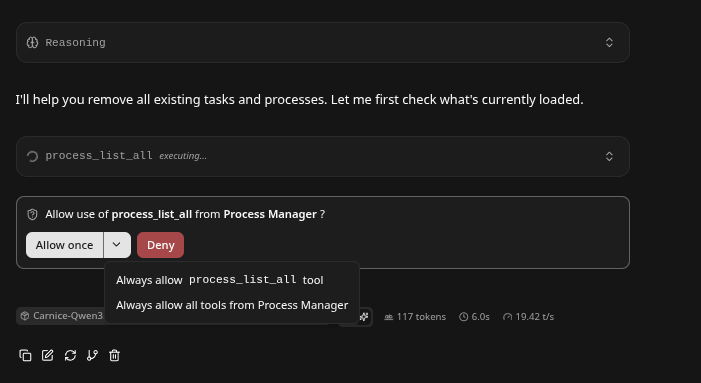
- Response times were dramatically faster, Qwen3.6 is very respectible (hence why we have not replaced it in like two months) - but it oftern over-thought.. This gave results at speeds near that of SOTA paid.. No way!! Ingest was insanely good too doubling older speeds. Also it didn't think about it so much - it just produced.
Conclusion
We saw about 21 Tokens per second on the output, that might seem slower than what were were getting with Turboquant, and the other flavor of Qwen3.6 but there was some important differences. However what it gave back in tokens it made up for in almost immediate output and very good 400 T/s ingest.
It felt so much like a SOTA paid model - yet it was producing from a local 4080ti GPU.
Models Matter - if you run a 27B dense it crushed the configuration, even loading the 4080 all the way to 14 GB it was a sloth - giving out only 2.7 Tokens/s. When we loaded a MoE from Candice it flew! Support the guys work!

Save your Context and Come Back
This process manager is very powerful in that your LLM can now save it's work and spread it across many contexts.
thinkmeltprotonmail.com
Get your LLM coding all Night! LLMQP
This LLM will enable you to queue multiple prompts which will execute one after another.
thinkmeltprotonmail.com