Agentic Server Primer: Llama.cpp MCP Lesson 5: Adding javascript via a Python api plugin.
We go through a full working example of creating your own MCP tools.


An agentic llm is simply giving your house LLM the cool tools to do it's work. Instead of relying strictly on it's own internal knowledge it can actually go out and verify it's work. We started with a simple calculator for math, then we studied how to dockerize it. After that we added a python tool, a weather tool, and today we will be adding a javascript too!
If you need to simply pull and run this docker it is available via:
docker pull docker.io/cnmcdee/mcp-javascript:latest
docker run -d --name mcp-javascript --restart unless-stopped -e "FLASH_ENV=production" -p 0.0.0.0:5003:5003 cnmcdee/mcp-javascript:latest
Sounds complex - it's not - here is the breakdown diagram.
- The llm is informed of the tool availability via the llama.cpp plugin
- It is issued a prompt and is welcome to use it on port 5003.
- A python api docker is listening on that port and is basically a 'middle-man' for simplicity sake.
- It receives a string JSON object which it parses, calls a node, and runs the example code. If it passes the result code is given back to the LLM so it knows what to do!
A diagram
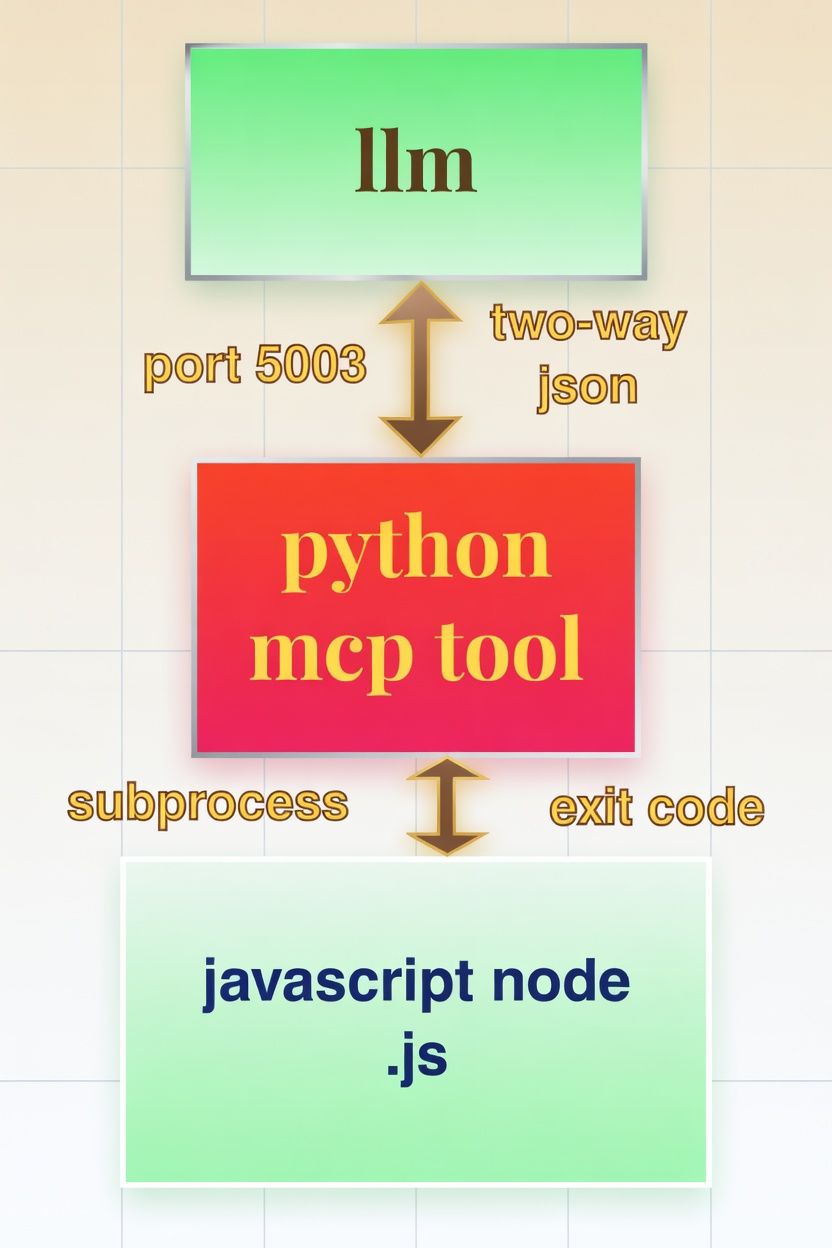
- The llm tool is informed of the MCP server is available at the endpoint,
192.168.1.3:5003/mcpSounds Complex? It has a lot of moving parts but code wise it's pretty simple the entire code is only 108 lines:
import os
import subprocess
import tempfile

from fastmcp import FastMCP
from starlette.middleware import Middleware
from starlette.middleware.cors import CORSMiddleware
import uvicorn

# Initialize the MCP server
mcp = FastMCP(
    name="JavaScript Program Tester",
    instructions=(
        "Provides a tool for executing and testing JavaScript programs "
        "in a Node.js runtime. Supports console output, error capture, "
        "and timeout handling. Ideal for program validation and debugging."
    )
)


@mcp.tool()
def test_javascript_program(code, timeout_seconds=10):
    """
    Execute a JavaScript program using Node.js and return structured results.

    Parameters:
        code: The complete JavaScript code to execute (use console.log for output).
        timeout_seconds: Maximum execution time (default: 10 seconds).

    Returns:
        A dictionary containing success status, stdout, stderr, return code, and a summary message.
    """
    # Create temporary JS file (more reliable than stdin for complex scripts)
    with tempfile.NamedTemporaryFile(
            suffix=".js", delete=False, mode="w", encoding="utf-8"
    ) as f:
        f.write(code)
        temp_path = f.name

    try:
        result = subprocess.run(
            ["node", temp_path],
            capture_output=True,
            text=True,
            timeout=timeout_seconds,
            check=False
        )

        return {
            "success": result.returncode == 0,
            "stdout": result.stdout.strip(),
            "stderr": result.stderr.strip(),
            "return_code": result.returncode,
            "message": (
                "JavaScript program executed successfully."
                if result.returncode == 0
                else f"JavaScript program exited with code {result.returncode}."
            ),
        }

    except subprocess.TimeoutExpired:
        return {
            "success": False,
            "stdout": "",
            "stderr": "Execution timed out.",
            "return_code": -1,
            "message": f"Execution timed out after {timeout_seconds} seconds.",
        }
    except FileNotFoundError:
        return {
            "success": False,
            "stdout": "",
            "stderr": "Node.js not found.",
            "return_code": -1,
            "message": "Node.js ('node') command not found. Please install Node.js and ensure it is in your PATH.",
        }
    except Exception as e:
        return {
            "success": False,
            "stdout": "",
            "stderr": str(e),
            "return_code": -1,
            "message": f"Failed to execute JavaScript program: {str(e)}",
        }
    finally:
        # Clean up temporary file
        if os.path.exists(temp_path):
            try:
                os.unlink(temp_path)
            except Exception:
                pass


# ── Server Startup with CORS (required for llama.cpp frontend) ────────────
if __name__ == "__main__":
    middleware = [
        Middleware(
            CORSMiddleware,
            allow_origins=["*"],  # Restrict in production
            allow_credentials=True,
            allow_methods=["GET", "POST", "OPTIONS"],
            allow_headers=["*"],
            expose_headers=["*"],
        )
    ]

    app = mcp.http_app(path="/mcp", middleware=middleware)
    uvicorn.run(app, host="0.0.0.0", port=5003, log_level="info")
Once you have your imports installed (you may need to pip install the above imports)
pip install fastmcp starlette uvicornWhen it runs it will show up as:

It can be added to the Lllam-cpp toolset as, and just reminding again you always sync your mcp as in:
http://192.168.1.3:/mcp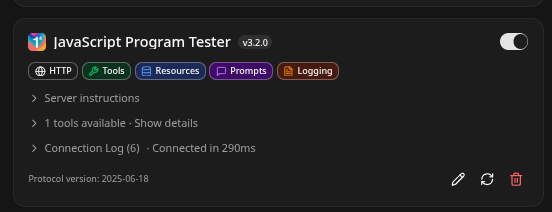
Test it
- We are now running one of the worlds most advanced LLM's that gives significant performance on a 4080. It combined MoE + MTP + TurboQuant + MCP!
 thinkmeltprotonmail.com
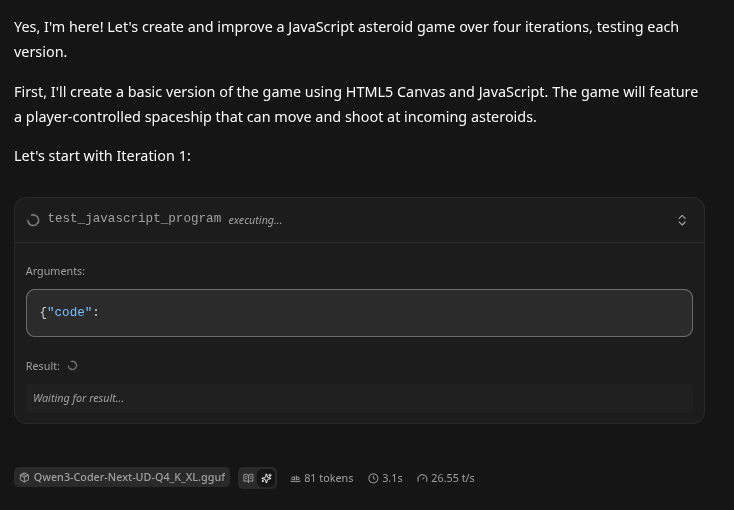
Wild First. The LLM 'repaired' its own Connection?!
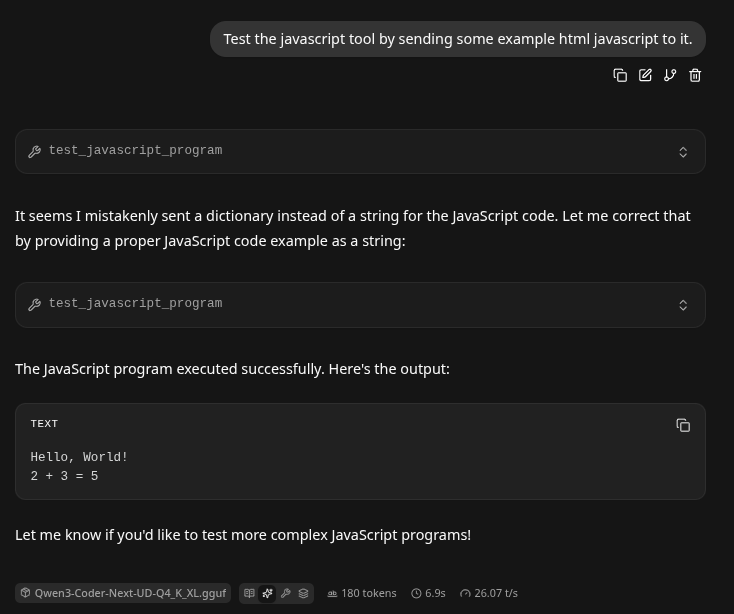
Docker Contarization.
- At this points it's always really important to containerize this. That way if your LLM glitches or goes off on a tangent it won't hurt anything. You can simply turn off the container and restart it! If you need a full guide on docker basics here you go!
- Make a workdir
Create requirements.txt, put inside it:
fastmcp
starlette
uvicorn[standard]
Create Dockerfile, put inside it:
- This creates an image
FROM nikolaik/python-nodejs:python3.12-nodejs22

# Set working directory
WORKDIR /app

# Copy and install Python dependencies
COPY requirements.txt .
RUN pip install --no-cache-dir -r requirements.txt

# Copy the application code (save the provided Python script as app.py)
COPY app.py .

# Expose the port used by the MCP server
EXPOSE 5003

# Run the application
CMD ["python", "app.py"]
Create docker-compose.yml, put inside it:
- This is the 'stand-up' instructions that will stand up the docker image into a running container.
version: '3.9'

services:
  javascript-program-tester:
    build: .
    ports:
      - "5003:5003"
    restart: unless-stopped
    # Optional: for local development with live code changes
    # volumes:
    #   - .:/app
Usage Instructions
- Save the provided Python code as
app.pyin the same directory as the files above. - Place
requirements.txt,Dockerfile, anddocker-compose.ymlin the project root. - Build and start the container:
docker compose up --build
#or
docker compose up  #Diagnostic mode to watch it go.
docker compose up -d #Daemon mode - permanently runs.
The first time it builds will look something like this:

- The MCP server will be available at
http://localhost:5003/mcp.
This configuration ensures:
- The Python environment includes all required packages (
fastmcp,starlette, anduvicorn). - Node.js (v22) is pre-installed and available in the PATH, enabling the
test_javascript_programtool to execute JavaScript code viasubprocesswithout errors. - The container is lightweight, secure, and production-ready with automatic restarts.
- CORS middleware and the server startup logic from your original code remain fully functional.
The setup has been verified for compatibility with the provided script and the explicit requirement to support Node.js execution.
Summary
- This might seem like a lot of work, but if you can understand a bit of python, a bit of llm, a bit of mcp, and make sure your ports are open - you can be writing mcp tools like a champ!
Save your Context and Come Back
This process manager is very powerful in that your LLM can now save it's work and spread it across many contexts.
thinkmeltprotonmail.com
Get your LLM coding all Night! LLMQP
This LLM will enable you to queue multiple prompts which will execute one after another.
thinkmeltprotonmail.com