Nvidia Driver cuda nvcc Troubleshooting

We had so many issues troubleshooting and getting our Nvidia drivers to work with our particular kernel of Linux (ParrotOS latest) that we wrote this guide. Pretty much every LLM needs the full suite of drivers/nvcc etc, so this guide might help you - with your current Linux kernel. You can ask a SOTA level model that will get you most of the way, but in the end it is these recipes that work. This is what worked for us.
- Because we are getting into cuda
nvcccompiler development this guide will cover the basics of setting up acuda-toolkiton top of custom compiling the very latest drivers.
In our case we are running a very recent version of Linux, and all the standard nvidia drivers were consistently breaking. We were seeing constant errors at /var/log/nvdia-installer.log Our errors:
┌─[✗]─[c@parrot]─[~]
└──╼ $uname -a
Linux parrot 7.0.9+parrot7-amd64 #1 SMP PREEMPT_DYNAMIC Parrot 7.0.9-1parrot1 (2026-05-28) x86_64 GNU/Linux
Firstly we purged out the drivers, and installed some supports:
sudo apt purge nvidia*
sudo apt update
sudo apt install dwarves libelf-dev build-essential linux-headers-$(uname -r)
Next we will work from this github:
- The purpose of this is to install the kernel level drivers that sit under the nvidia main drivers.
 NVIDIA
So:
Part 1. Getting to nvidia-smi
git clone https://github.com/NVIDIA/open-gpu-kernel-modules
cd open-gpu-kernel-modules/
Next:
make modules -j$(nproc)
sudo make modules_install -j$(nproc)
At this point you may reach errors thus:
sudo apt install mokutil && mokutil --sb-state
sudo depmod -a
sudo modprobe nvidia
Installing the main Nvidia 6.10 drivers w/ --no-kernel-modules Option
- At this point we will need to get the latest main drivers and specifically install them as in:
wget https://us.download.nvidia.com/XFree86/Linux-x86_64/610.43.02/NVIDIA-Linux-x86_64-610.43.02.run
chmod +x NVIDIA-Linux-x86_64-610.43.02.run
sudo ./NVIDIA-Linux-x86_64-610.43.02.run --no-kernel-modules
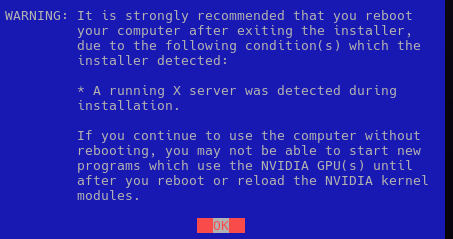
You will get a warning where you are installing the latest Nvidia drivers - without installing the kernel drivers because you did that manually above:
- So..
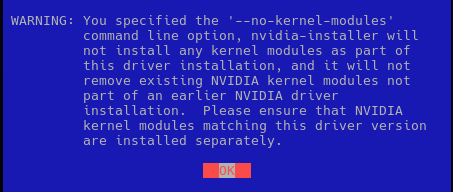
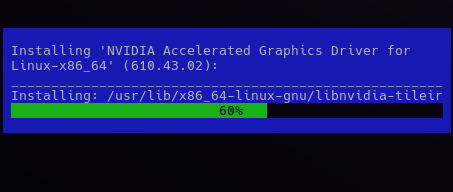
This actually worked, wow!
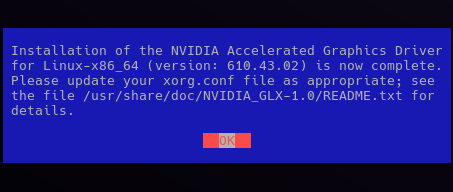
We pulled this off while in GUI X-11 mode, as in:
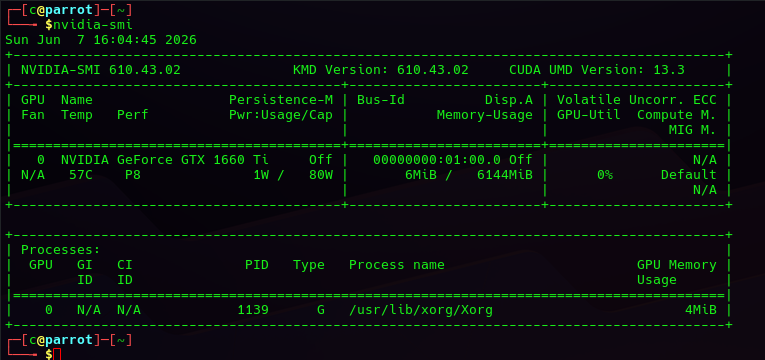
After sudo reboot we actually have our basic nvidia-smi:
- Almost there!
Part II: Getting to nvcc / cuda-toolkit
- If your
nvida-smidriver is installed we can now focus on thenvidia-cuda-toolkit,
Try 1: script
# Download and install the CUDA repository keyring
wget https://developer.download.nvidia.com/compute/cuda/repos/ubuntu2404/x86_64/cuda-keyring_1.1-1_all.deb
sudo dpkg -i cuda-keyring_1.1-1_all.deb

# Refresh package lists
sudo apt update

# Install the CUDA Toolkit (includes nvcc and development components)
sudo apt install cuda-toolkit
Or Try 2: Direct download from
wget https://developer.download.nvidia.com/compute/cuda/repos/ubuntu2604/x86_64/cuda-ubuntu2604.pin
sudo mv cuda-ubuntu2604.pin /etc/apt/preferences.d/cuda-repository-pin-600
wget https://developer.download.nvidia.com/compute/cuda/13.3.0/local_installers/cuda-repo-ubuntu2604-13-3-local_13.3.0-610.43.02-1_amd64.deb
sudo dpkg -i cuda-repo-ubuntu2604-13-3-local_13.3.0-610.43.02-1_amd64.deb
sudo cp /var/cuda-repo-ubuntu2604-13-3-local/cuda-*-keyring.gpg /usr/share/keyrings/
sudo apt-get update
sudo apt-get -y install cuda-toolkit-13-3
At this point, we are looking at large downloads as it pulls in the supports.
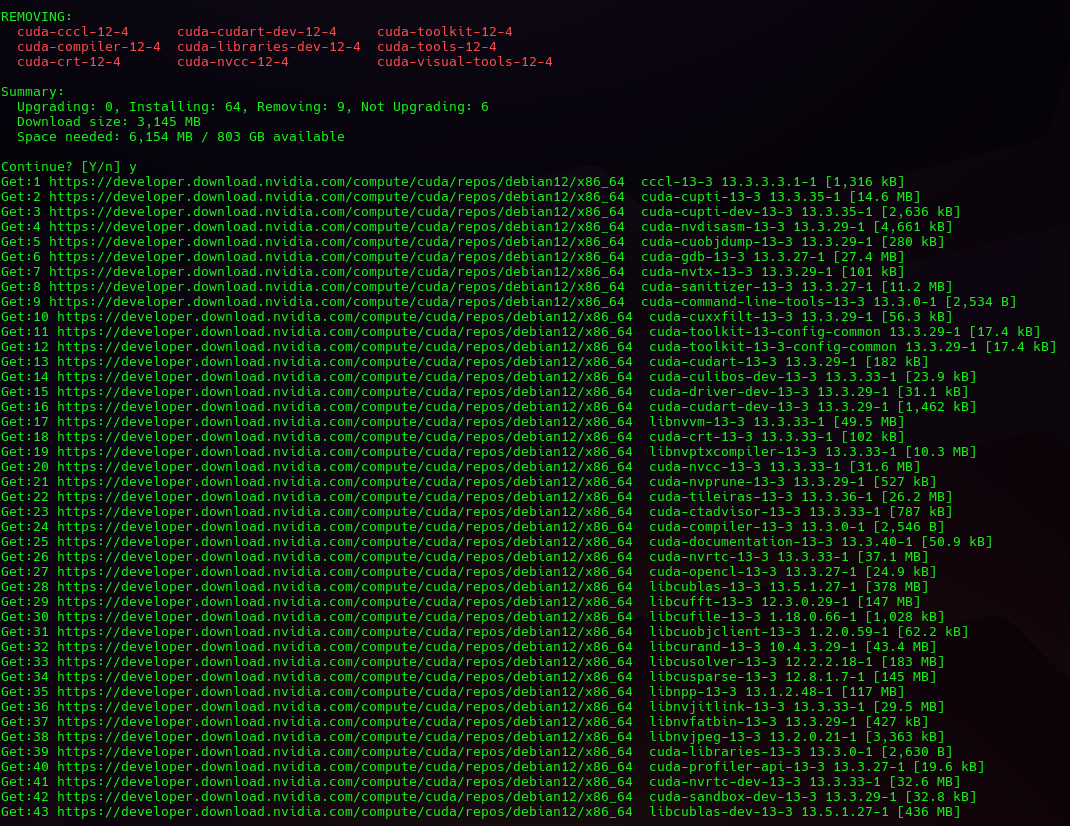
A successful run will give this at the end:
Processing triggers for desktop-file-utils (0.28-1) ...
Processing triggers for mailcap (3.74) ...
Scanning processes...
Scanning processor microcode...
Scanning linux images...

Running kernel seems to be up-to-date.

The processor microcode seems to be up-to-date.

No services need to be restarted.

No containers need to be restarted.

No user sessions are running outdated binaries.

No VM guests are running outdated hypervisor (qemu) binaries on this host.
--------------------------------------------------
[!] Scanning application launchers
Removing duplicate or broken launchers...
[!] Launchers have been successfully updated!
--------------------------------------------------
A Working CLion Example
- This is a working CMakeLists.txt / main.cpp / json_support.h example for your reference for Clion (Jetbrains product)
- It also does a minimal cuda call.
cmake_minimum_required(VERSION 3.18)

set(CMAKE_CUDA_COMPILER "/usr/local/cuda-13.3/bin/nvcc")

project(MyImGuiCuda LANGUAGES CXX CUDA)

set(CMAKE_CXX_STANDARD 17)
set(CMAKE_CXX_STANDARD_REQUIRED ON)
set(CMAKE_CUDA_STANDARD 17)
set(CMAKE_CUDA_ARCHITECTURES 75)

set(CUDAToolkit_ROOT "/usr/local/cuda-13.3")
list(APPEND CMAKE_PREFIX_PATH "/usr/local/cuda-13.3")
find_package(CUDAToolkit REQUIRED)

find_package(OpenGL REQUIRED)
find_package(glfw3 REQUIRED)

include(FetchContent)

FetchContent_Declare(imgui GIT_REPOSITORY https://github.com/ocornut/imgui.git GIT_TAG v1.91.8-docking)
FetchContent_Declare(implot GIT_REPOSITORY https://github.com/epezent/implot.git GIT_TAG v0.16)
FetchContent_Declare(cpr GIT_REPOSITORY https://github.com/libcpr/cpr.git GIT_TAG 1.11.1)
FetchContent_Declare(nlohmann_json GIT_REPOSITORY https://github.com/nlohmann/json.git GIT_TAG v3.11.3)

FetchContent_MakeAvailable(imgui implot cpr nlohmann_json)

set(IMGUI_SOURCES
        ${imgui_SOURCE_DIR}/imgui.cpp
        ${imgui_SOURCE_DIR}/imgui_draw.cpp
        ${imgui_SOURCE_DIR}/imgui_tables.cpp
        ${imgui_SOURCE_DIR}/imgui_widgets.cpp
        ${imgui_SOURCE_DIR}/backends/imgui_impl_glfw.cpp
        ${imgui_SOURCE_DIR}/backends/imgui_impl_opengl3.cpp
)

set(IMPLOT_SOURCES
        ${implot_SOURCE_DIR}/implot.cpp
        ${implot_SOURCE_DIR}/implot_items.cpp
)

add_executable(my_imgui_cuda
        main.cpp
        json_support.cpp
        json_support.h
        ${IMGUI_SOURCES}
        ${IMPLOT_SOURCES}
)

target_include_directories(my_imgui_cuda PRIVATE
        ${imgui_SOURCE_DIR}
        ${imgui_SOURCE_DIR}/backends
        ${implot_SOURCE_DIR}
        ${CUDAToolkit_INCLUDE_DIRS}
)

target_link_libraries(my_imgui_cuda PRIVATE
        glfw
        OpenGL::GL
        CUDA::cudart
        cpr::cpr
        nlohmann_json::nlohmann_json
        ${CMAKE_DL_LIBS}
)

set_target_properties(my_imgui_cuda PROPERTIES CUDA_SEPARABLE_COMPILATION ON)
set(CMAKE_EXPORT_COMPILE_COMMANDS ON)
And inside our main.cpp we have some polygon.io boilerplate:
#include <GLFW/glfw3.h>
#include <cuda_runtime.h>
#include <iostream>

#include "imgui.h"
#include "imgui_impl_glfw.h"
#include "imgui_impl_opengl3.h"
#include "implot.h"

#include <iostream>
#include <string>
#include "json_support.h"


int main()
{

    // region test_api call
    // Create the client with the base URL
    JsonSupport api("https://api.massive.com", 15000);   // 15 second timeout

    // Your API key (replace with your real key)
    std::string api_key = "";

    // Build the query
    std::string endpoint = "/v3/reference/options/contracts?"
                           "apiKey=" + api_key +
                           "&underlying_ticker=AAPL"
                           "&contract_type=call"
                           "&limit=20"
                           "&order=asc";

    // Make the request
    nlohmann::json response = api.get(endpoint);

    // Check for errors
    if (response.contains("error") || response.contains("status_code")) {
        std::cerr << "API Error: " << response.dump(4) << std::endl;
        return 1;
    }

    // Print results
    if (response.contains("results")) {
        std::cout << "Found " << response["results"].size() << " contracts\n\n";

        for (const auto& contract : response["results"]) {
            std::cout << contract["ticker"].get<std::string>()
                      << " | Strike: " << contract["strike_price"]
                      << " | Exp: " << contract["expiration_date"].get<std::string>()
                      << " | Type: " << contract["contract_type"].get<std::string>()
                      << std::endl;
        }
    } else {
        std::cout << response.dump(4) << std::endl;
    }


    // endregion


    // region GLFW window
    glfwInit();
    glfwWindowHint(GLFW_CONTEXT_VERSION_MAJOR, 3);
    glfwWindowHint(GLFW_CONTEXT_VERSION_MINOR, 3);
    glfwWindowHint(GLFW_OPENGL_PROFILE, GLFW_OPENGL_CORE_PROFILE);
    GLFWwindow* window = glfwCreateWindow(1280, 720, "ImGui + CUDA Example", nullptr, nullptr);
    glfwMakeContextCurrent(window);
    glfwSwapInterval(1);
    // endregion
    // region ImGui setup
    IMGUI_CHECKVERSION();
    ImGui::CreateContext();
    ImPlot::CreateContext();
    ImGuiIO& io = ImGui::GetIO(); (void)io;
    ImGui::StyleColorsDark();
    ImGui_ImplGlfw_InitForOpenGL(window, true);
    ImGui_ImplOpenGL3_Init("#version 330");
    // endregion
    // region Simple CUDA check
    int deviceCount = 0;
    cudaGetDeviceCount(&deviceCount);
    std::cout << "CUDA devices: " << deviceCount << std::endl;

    float values[100] = {0};  // Sample data for plotting

    while (!glfwWindowShouldClose(window)) {
        glfwPollEvents();

        ImGui_ImplOpenGL3_NewFrame();
        ImGui_ImplGlfw_NewFrame();
        ImGui::NewFrame();

        ImGui::Begin("Hello ImGui + CUDA");
        ImGui::Text("CUDA devices detected: %d", deviceCount);
        ImGui::End();

        ImGui::Begin("Simple Plot");
        if (ImPlot::BeginPlot("Sample Plot")) {
            ImPlot::PlotLine("Values", values, 100);
            ImPlot::EndPlot();
        }
        ImGui::End();

        // Render
        ImGui::Render();
        int display_w, display_h;
        glfwGetFramebufferSize(window, &display_w, &display_h);
        glViewport(0, 0, display_w, display_h);
        glClearColor(0.1f, 0.1f, 0.1f, 1.0f);
        glClear(GL_COLOR_BUFFER_BIT);
        ImGui_ImplOpenGL3_RenderDrawData(ImGui::GetDrawData());
        glfwSwapBuffers(window);
    }
    // endregion
    // region  Cleanup
    ImGui_ImplOpenGL3_Shutdown();
    ImGui_ImplGlfw_Shutdown();
    ImPlot::DestroyContext();
    ImGui::DestroyContext();
    glfwDestroyWindow(window);
    glfwTerminate();
    // endregion

    return 0;
}
And inside our json_support.h
// region JsonSupport Class
#pragma once

#include <cpr/cpr.h>
#include <nlohmann/json.hpp>
#include <string>
#include <optional>

class JsonSupport {
public:
    explicit JsonSupport(std::string base_url = "", int timeout_ms = 10000)
        : base_url_(std::move(base_url)), timeout_ms_(timeout_ms) {}

    // Set authentication token once (used for all subsequent requests)
    void set_bearer_token(const std::string& token) {
        bearer_token_ = token;
    }

    void set_timeout(int timeout_ms) {
        timeout_ms_ = timeout_ms;
    }

    // GET request
    nlohmann::json get(const std::string& endpoint) {


        std::string url = build_url(endpoint);

        cpr::Header headers = build_headers();

        auto response = cpr::Get(
            cpr::Url{url},
            headers,
            cpr::Timeout{timeout_ms_}
        );

        return handle_response(response);
    }

    // POST request with optional JSON body
    nlohmann::json post(const std::string& endpoint,
                        const nlohmann::json& payload = nlohmann::json{}) {
        std::string url = build_url(endpoint);
        cpr::Header headers = build_headers();
        headers["Content-Type"] = "application/json";

        auto response = cpr::Post(
            cpr::Url{url},
            headers,
            cpr::Body{payload.dump()},
            cpr::Timeout{timeout_ms_}
        );

        return handle_response(response);
    }

private:
    std::string base_url_;
    int timeout_ms_;
    std::string bearer_token_;

    std::string build_url(const std::string& endpoint) const {
        if (base_url_.empty()) {
            return endpoint;
        }
        if (endpoint.empty()) {
            return base_url_;
        }
        // Simple URL joining
        if (base_url_.back() == '/' && endpoint.front() == '/') {
            return base_url_ + endpoint.substr(1);
        } else if (base_url_.back() != '/' && endpoint.front() != '/') {
            return base_url_ + "/" + endpoint;
        }
        return base_url_ + endpoint;
    }

    cpr::Header build_headers() const {
        cpr::Header headers;
        if (!bearer_token_.empty()) {
            headers["Authorization"] = "Bearer " + bearer_token_;
        }
        return headers;
    }

    nlohmann::json handle_response(const cpr::Response& response) const {
        if (response.status_code >= 200 && response.status_code < 300) {
            if (response.text.empty()) {
                return nlohmann::json::object();
            }
            try {
                return nlohmann::json::parse(response.text);
            } catch (...) {
                return nlohmann::json{{"raw_response", response.text}};
            }
        } else {
            nlohmann::json error;
            error["status_code"] = response.status_code;
            error["error"] = response.error.message;
            if (!response.text.empty()) {
                error["body"] = response.text;
            }
            return error;
        }
    }
};
// endregion
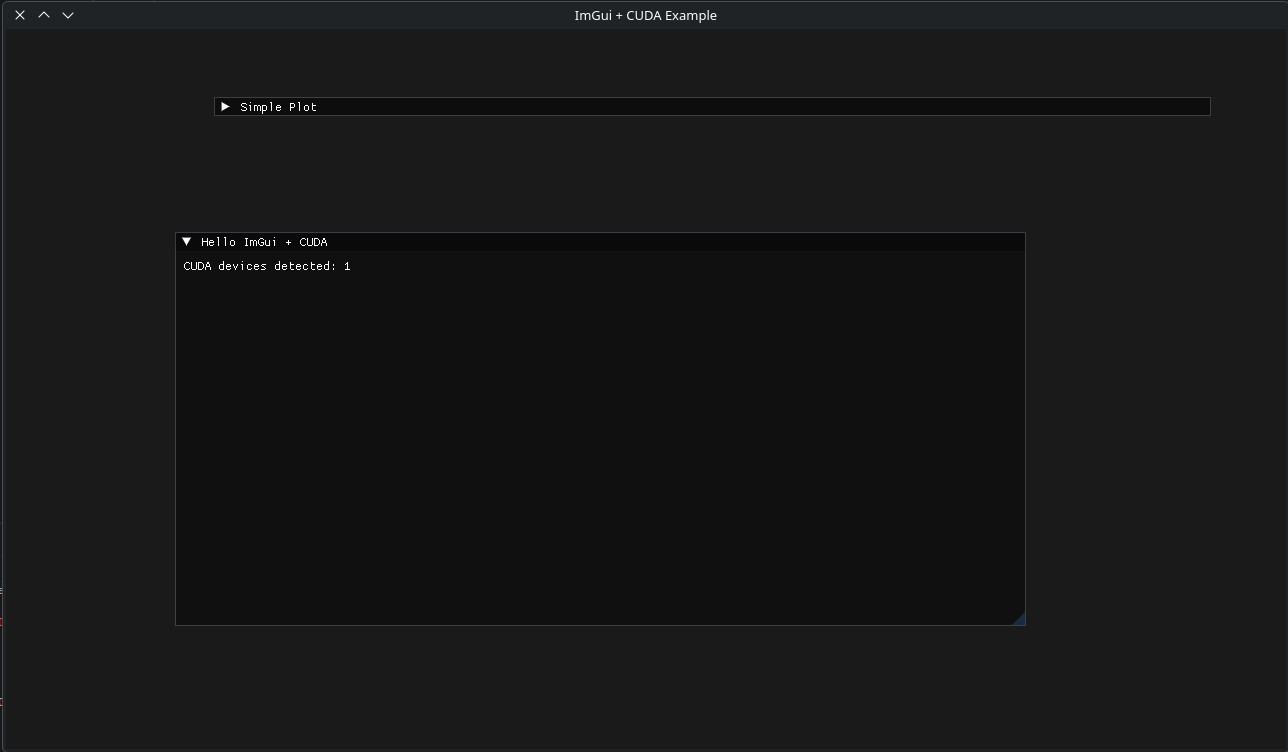
This is interesting because it will produce a super-fast gui interface, rudimentary but cool!
Save your Context and Come Back
This process manager is very powerful in that your LLM can now save it's work and spread it across many contexts.
 thinkmeltprotonmail.com
Get your LLM coding all Night! LLMQP
This LLM will enable you to queue multiple prompts which will execute one after another.
thinkmeltprotonmail.com