Writing Your Own X-11 Framework Basics (Part 2) Virtual Buttons
In Part-2 We Build a Simple Button Manager Class that can monitor for events.


In our previous post we studied the X-11 Framework in detail,
 thinkmeltprotonmail.com
We learned the very basics of a display which is either a virtual reference or a real reference which differs from the screen which is your monitors 0-2 in a three-header monitor setup. We also learned that the graphical context is the 'pen' that you use to write with. We look at setting masks so that your application will receive various events like a mouse click or keypress. Finally we learned the various drawing commands such as XDrawLines and XDrawRectangles which we can use to make primitive drawings, and writing text with XDrawString
But that is where it ends, we have to build our buttons, labels and editbox from scratch, but that's the fun part - we can now create any type of widget we want.
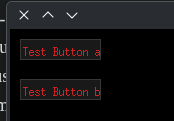
To make this very simple we will start with virtual button manager that will print to the console when the user clicks inside the corresponding button window, so a simple example:
Before any X-11 development can be done, you will need the support libraries:
sudo apt install libx11-dev -yAlso you typically will need the following if you are using CMakeLists.txt
cmake_minimum_required(VERSION 3.20)
project(XFrame LANGUAGES CXX)
set(CMAKE_CXX_STANDARD 17)
set(CMAKE_CXX_STANDARD_REQUIRED ON)
find_package(X11 REQUIRED)
add_executable(XFrame main.cpp)
target_link_libraries(XFrame PRIVATE X11::X11)
When this is done the buttons will look like this:
#include <X11/Xlib.h>
#include <X11/Xutil.h>
#include <X11/fonts/font.h>
#include <algorithm>
#include <cstdint>
#include <cstdlib>
#include <vector>
#include <algorithm>
#include <cstring>
#include <iostream>
#include <string>
#include <stdio.h>
#include <memory>


struct SButton
{
    std::string name;
    int x1, y1, x2, y2;
};
//region Button_Manager
class Button_Manager
{
private:
    std::vector<SButton> buttons;
    Display *display_;
    Window window_;
    int screen_;
    GC gc_;

    unsigned long grey_color_ = 0;
    unsigned long bright_grey_ = 0;
    unsigned long bright_red_ = 0;

public:
    Button_Manager(Display* display, int screen, Window window, GC gc)
    {
        display_ = display;
        screen_ = screen;
        window_ = window;
        gc_ = gc;
        grey_color_ = get_color_rgb(25, 25, 25);
        bright_grey_ = get_color_rgb( 55, 55, 55);
        bright_red_ = get_color_rgb(205, 35, 35);
    }
    ~Button_Manager(){}
    void add_button(int x1, int y1, int x2, int y2, std::string name)
    {
        SButton button;
        button.x1 = x1;
        button.y1 = y1;
        button.x2 = x2;
        button.y2 = y2;
        button.name = name;
        buttons.push_back(button);
    }
    void add_buttonwh(int x1, int y1, int width, int height, std::string name)
    {
        SButton button;
        button.x1 = x1;
        button.y1 = y1;
        button.x2 = x1 + width;
        button.y2 = y1 + height;
        button.name = name;
        buttons.push_back(button);
    }
    std::string clicked(int x, int y)
    {
        for (size_t i = 0; i < buttons.size(); i++)
        {
            if ((x >= buttons[i].x1 && x <= buttons[i].x2) && (y >= buttons[i].y1 && y <= buttons[i].y2))
            {
            return buttons[i].name;
            }
        }
    }
    unsigned long get_color_rgb(unsigned char r, unsigned char g, unsigned char b)
    {
        XColor xcolor;
        xcolor.red = r << 8;
        xcolor.green = g << 8;
        xcolor.blue = b << 8;
        if (XAllocColor(display_, DefaultColormap(display_, screen_), &xcolor))
        {
            return xcolor.pixel;
        } else {
            printf("Failed to allocate color! RGB(%d,%d,%d)\n", r, g, b);
            return BlackPixel(display_, screen_);  // Fallback
        }
    }
    void center_text_in_button(SButton button)
    {

        std::string ref_text = button.name;

        // Load and query the font (using "fixed" as a common default)
        XFontStruct *font = XLoadQueryFont(display_, "-misc-fixed-medium-r-normal--9-*");

        if (!font)
        {
            printf("Failed to load font\n");
            return;
        }

        int x = button.x1 + 3;
        int y = button.y2 - 3;


        XSetForeground(display_, gc_, bright_red_);
        XDrawString(display_, window_, gc_, x, y, ref_text.c_str(), strlen(ref_text.c_str()));

        // Clean up when done with font operations
        XFreeFont(display_, font);
    }

    void draw_buttons()
    {
        for (size_t i = 0; i < buttons.size(); ++i)
        {
            SButton button = buttons[i];
            int width = button.x2 - button.x1;
            int height = button.y2 - button.y1;
            XSetForeground(display_, gc_, grey_color_);
            XFillRectangle(display_, window_, gc_,  button.x1, button.y1, width, height);
            XSetForeground(display_, gc_, bright_grey_);
            XDrawRectangle(display_, window_, gc_, button.x1, button.y1, width, height);
            center_text_in_button(button);
        }
        XFlush(display_);
    }
};


int main()
{
    Display* display = XOpenDisplay(nullptr);
    if (!display) {return 1; }
    int screen = DefaultScreen(display);
    XID Xid = RootWindow(display, screen);
    Window window = XCreateSimpleWindow(display, Xid,100,100,800,600,1, WhitePixel(display, screen), BlackPixel(display, screen));
    XStoreName(display, window, "My C++ Canvas Framework");
    XSelectInput(display, window, ButtonPressMask | KeyPressMask | ExposureMask);
    Atom deleteWindowMessage = XInternAtom(display, "WM_DELETE_WINDOW", False);
    XSetWMProtocols(display,window,&deleteWindowMessage,1);
    XMapWindow(display, window);
    GC gc = DefaultGC(display, screen);
    Button_Manager bm(display, screen, window, gc);
    bm.add_buttonwh(10, 10, 80, 20, "Test Button a");
    bm.add_buttonwh(10,50, 80, 20, "Test Button b");
    bm.draw_buttons();
    bool running = true;
    while (running)
    {
        XEvent event;
        if (!XPending(display)) {continue;}
        XNextEvent(display, &event);
        switch (event.type)
        {
            case ButtonPress:
            {
                int x1 = event.xbutton.x, y1 = event.xbutton.y;
                std::string name = bm.clicked(event.xbutton.x, event.xbutton.y);
                std::cout << "You pressed:" << name << std::endl;
            }
            case Expose:
            {
                bm.draw_buttons();
                break;
            }
            case ConfigureNotify:
            {
                break;
            }
            case KeyPress:
            {
                break;
            }
            case ClientMessage:
            {
                break;
            }
        }
    }
    XCloseDisplay(display);
    return 0;
}
Going over this code in detail, starting with main:
int main()
{
    Display* display = XOpenDisplay(nullptr);
    if (!display) {return 1; }
    int screen = DefaultScreen(display);
    XID Xid = RootWindow(display, screen);
    Window window = XCreateSimpleWindow(display, Xid,100,100,800,600,1, WhitePixel(display, screen), BlackPixel(display, screen));
    XStoreName(display, window, "My C++ Canvas Framework");
    XSelectInput(display, window, ButtonPressMask | KeyPressMask | ExposureMask);
    Atom deleteWindowMessage = XInternAtom(display, "WM_DELETE_WINDOW", False);
    XSetWMProtocols(display,window,&deleteWindowMessage,1);
    XMapWindow(display, window);
    GC gc = DefaultGC(display, screen);
    Button_Manager bm(display, screen, window, gc);
    bm.add_buttonwh(10, 10, 80, 20, "Test Button a");
bm.add_buttonwh(10,50, 80, 20, "Test Button b");- We ask for a
Display* displaywhich is the virtual or real result from a call toXOpenDisplay(nullptr);Recall that in linux this can be a completely virtual desktop.. If(!display)kick back an error and exit. - We then get the corresponding screen (typicallly 0) with
int screen = DefaultScreen(display)Do recall if you have multiple-head monitors and launch your application into screen 1, 2 it will return that. - Again
XID Xid = RootWindow(display, screen);is simply a UID resource of the display screen combination when we called it we receieved836, however it is needed so that we can create the window in the next line Window window = XCreateSimpleWindow(display, Xid,100,100,800,600,1, WhitePixel(display, screen), BlackPixel(display, screen));sets the dimensions for our application, starting at a x,y offset of100, 100and with a width:800and height600XStoreNamesets the title for the application.XSelectInput(display, window, ButtonPressMask | KeyPressMask | ExposureMask)sets up our event handlers. For a full list of them see the base article that this is based off of:
thinkmeltprotonmail.com- The next lines set up default destructor handling, sets a default context etc;
 Atom deleteWindowMessage = XInternAtom(display, "WM_DELETE_WINDOW", False);
    XSetWMProtocols(display,window,&deleteWindowMessage,1);
    XMapWindow(display, window);
    GC gc = DefaultGC(display, screen);
Custom Button Handler
This is where the fun begins, we have written our own custom basic button handler class. It needs several working parts.
- A Constructor that logs the
display,screen,window, andgcinformation at creation time. By doing it this way the rest of the calls no longer need to record it, and it is dutifully recorded in the constructor call:
    Button_Manager(Display* display, int screen, Window window, GC gc)
    {
        display_ = display;
        screen_ = screen;
        window_ = window;
        gc_ = gc;
        grey_color_ = get_color_rgb(25, 25, 25);
        bright_grey_ = get_color_rgb( 55, 55, 55);
        bright_red_ = get_color_rgb(205, 35, 35);
}- Of importance we pre-register the colors that we want to use with the
get_color_rgbfunction which is listed in the code.
Next we have a add_button that will take it's x1, y1, x2, y2, name as parameters or alternately you can add it as x1, y1, width, height, name with the add_buttonwh function.
Event Handler
- The event handler is quite simple, any mouse clicks are passed to the class handler and it will check the x,y dimensions if they are inside the corresponding box, if they are it will return the
std::stringof the name of the button that was clicked.
    std::string clicked(int x, int y)
    {
        for (size_t i = 0; i < buttons.size(); i++)
        {
            if ((x >= buttons[i].x1 && x <= buttons[i].x2) && (y >= buttons[i].y1 && y <= buttons[i].y2))
            {
            return buttons[i].name;
            }
        }
    }
Draw Buttons
Finally we have a draw buttons, and hence the requirement that the class object record all the pertinent information from the system so that a call to draw buttons is simply:
bm.drawbuttons();
The draw buttons will look as:
    void draw_buttons()
    {
        for (size_t i = 0; i < buttons.size(); ++i)
        {
            SButton button = buttons[i];
            int width = button.x2 - button.x1;
            int height = button.y2 - button.y1;
            XSetForeground(display_, gc_, grey_color_);
            XFillRectangle(display_, window_, gc_,  button.x1, button.y1, width, height);
            XSetForeground(display_, gc_, bright_grey_);
            XDrawRectangle(display_, window_, gc_, button.x1, button.y1, width, height);
            center_text_in_button(button);
        }
        XFlush(display_);
    }
center_text_in_button will use the red to draw the text.
XFlush(display_) is required as all the XFillRectangle and XDrawRectangle will not actually execute until XFlush is required.
Conclusion
- This is a basic button drawing application but we are no longer fighting with another framework manager's decision to force oversize our buttons. Yes our layouts are pretty basic, but now we can create any custom button / widget that we desire! So naturally the next is to look at some goals
- Making stylish buttons
- Making edit / text boxes that can accept input
- Making more advanced widgets!
Finally at the end make a drawing IDE that will let you simply draw an application that will spit out fast boiler plate code!