Qwen3.5-122B-A10B-Q4_K_M.gguf - Run it at 13 Tokens/s with 262,000 Contexts on a Ryzen 9 3900 and a 4080ti. w/128GB RAM.
Qwen3.5-122B-A10B-Q4_K_M.gguf - Run it at 13 Tokens/s with 262,000 Contexts on a Ryzen 9 3900 and a 4080ti. w/128GB RAM.


Seriously.
- We ran a industrial grade LLM that can one-shot an entire Asteroids game, and is bleeding edge SOTA for 2026 on a $2000 house computer. How did we do it? Let's get started!
A. Install your basics
sudo apt install build-essential cmake python3 wget gitB. Latest Nvidia Cuda ToolKit Drivers w/nvcc
- nvcc is a compiler specific to advanced Cuda Nvidia GPUs.
wget https://developer.download.nvidia.com/compute/cuda/13.2.0/local_installers/cuda-repo-debian13-13-2-local_13.2.0-595.45.04-1_amd64.deb
sudo dpkg -i cuda-repo-debian13-13-2-local_13.2.0-595.45.04-1_amd64.deb
sudo cp /var/cuda-repo-debian13-13-2-local/cuda-*-keyring.gpg /usr/share/keyrings/
sudo apt-get update
sudo apt-get -y install cuda-toolkit-13-2- Make sure it works with nvcc --version, it will look like this:
c@dragon-192-168-1-3:~/models$ nvcc --version
nvcc: NVIDIA (R) Cuda compiler driver
Copyright (c) 2005-2026 NVIDIA Corporation
Built on Mon_Mar_02_09:52:23_PM_PST_2026
Cuda compilation tools, release 13.2, V13.2.51
Build cuda_13.2.r13.2/compiler.37434383_0
Got it good! Lets get an advanced llama-cpp now
C. Installing the Latest Llama-cpp.
- Not any will do we are going to add in SOTA level TurboQuant capability:
git clone https://github.com/johndpope/llama-cpp-turboquant.git
cd llama-cpp-turboquant && git checkout feature/planarquant-kv-cache
Tricky Part (A) is Here
This part was exceptionally tricky because if you don't get it pretty much spot it just doesn't compile. We spent considerable time, but in essence we are doing this as specific parameters are required in order for it to compile.
Go into the pulled git repository directory (llama-cpp-turboquant) and make a file named build.sh, put inside of it:
cmake  -DGGML_CUDA=ON \
-DCMAKE_CUDA_ARCHITECTURES=native \
-DCMAKE_CUDA_COMPILER_WORKS=TRUE \
-DCMAKE_CUDA_COMPILER=/usr/local/cuda/bin/nvcc

cmake --build . --config Release -j$(nproc)
chmod it so it's executable, naturally:
chmod +x build.shRun it.
./build.shAnd now wait. It Takes some time, and it may kick up errors we tried many things to get this to work but the above configuration worked for us. If it works you will see after a bin directory:
It will look like this if the compile and build worked:

If you have no other llama-cpp - as this is the special fork with TurboQuant / PolarQuant you can just copy all those files to your /usr/bin as in:
sudo cp * /usr/binThe other option is just cp all of these to your own directory somewhere like ~/llama and then write your scripts from inside there.
Easy Part - Get some Models!
- Were almost there, time to get some models! You got this! Go to hugging face and pick out a model that will either fit your GPU and or share it with your CPU. Because TurboQuant and PolarQuant utterly sped up the speed of the KV Cache, this was basically impossible as of February 2026 to run inside a CPU, but now - yes you can!
- We are building an example that worked to the limits of our equipment we had - which was a 4080ti 16GB VRAM and a Ryzen 9 3900 w/128 GB of RAM. You will need to tinker, but we will show it's really easy.
- A direct link for a 120 GB SOTA level MOE

Got it downloaded to your ~/models folder? Good! The last part is to simply activate it with Llama.cpp.
- You want to make some scripts. In essence the scripts will be fine-tuned to load the model, offload as much as it can to the GPU, also activate the specialty kv_cache TurboQuant to give yourself incredible speed boosts. Our exact script and we will get Grok 4 to describe every part of it and how we ran it.
- In our instance we copied the above llama files as describe to our /usr/bin otherside just change the start of the script to where llama-server lives
/usr/bin/llama-server --jinja \
-m /home/c/models/Qwen3.5-122B-A10B-Q4_K_M.gguf \
--host 192.168.1.3 \
--n-gpu-layers 999 \
--override-tensor "\.ffn_.*_exps\.weight=CPU" \
--flash-attn on \
--cache-type-k turbo3 \
--cache-type-v turbo3 \
-c 262144 \
--temp 0.7
Just in case you are not sure what to do now - open a browser and go to where it sits which is typically port 8080. Your House LLM is sitting there. Ready to one-shot Asteroids or whatever you want to do with it.
http://192.168.1.3:8080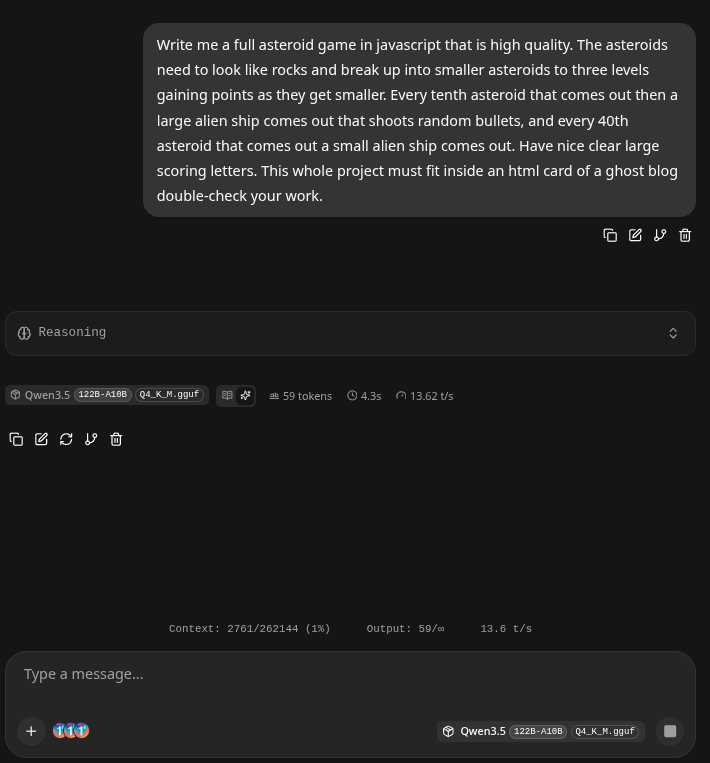
Command Summary and HAVE FUN!
This command launches the llama-server binary (part of the llama.cpp project), which provides a lightweight, high-performance HTTP server for local large language model (LLM) inference. It implements an OpenAI-compatible API and includes a built-in web interface, enabling clients to interact with the model via standard REST endpoints for chat completions, completions, embeddings, and related tasks.
The command configures the server to run the Qwen3.5-122B-A10B model (a Mixture-of-Experts architecture with approximately 122 billion total parameters and 10 billion active parameters per token) in a highly optimized manner. It maximizes GPU acceleration while selectively managing memory usage for a large-scale MoE model, supports an extended 256K-token context window, and applies advanced quantization and attention optimizations.
Below is a detailed, parameter-by-parameter breakdown of the command:
- /usr/bin/llama-serverThe full path to the compiled llama-server executable. This binary serves as the entry point for the server process.
- --jinja Explicitly enables the Jinja2 templating engine for processing chat templates. This is required (or strongly recommended) for models such as Qwen3.5, which rely on complex, model-specific Jinja-based chat templates stored in the GGUF metadata. It ensures accurate formatting of system/user/assistant messages and any special tokens or reasoning structures.
- -m /home/c/models/Qwen3.5-122B-A10B-Q4_K_M.gguf Specifies the path to the GGUF-format model file. This is a 4-bit quantized version (Q4_K_M) of the Qwen3.5-122B-A10B MoE model. The Q4_K_M quantization provides a strong balance of model quality and memory efficiency.
- --host 192.168.1.3 Binds the HTTP server to the specific network interface with IP address 192.168.1.3. This restricts listening to that address (instead of the default 0.0.0.0 or localhost), which is useful for controlled network exposure in a local LAN environment.
- --n-gpu-layers 999 Instructs the backend to offload as many model layers as possible (up to 999) to the GPU. The large value effectively offloads the entire feasible portion of the model to GPU memory, maximizing inference speed while respecting hardware limits.
- --override-tensor ".ffn_.*_exps.weight=CPU" Overrides the default buffer placement for specific model tensors. The regular expression targets all feed-forward network (FFN) expert weights (ffn_.*_exps.weight) and forces them onto the CPU. This is a critical optimization for large MoE models. Expert weights consume the majority of VRAM in such architectures; placing them on CPU (while keeping dense layers and other components on GPU) dramatically reduces GPU memory usage without severely impacting performance, enabling the 122B-parameter model to run on consumer or mid-range GPUs.
- --flash-attn on Explicitly enables Flash Attention (a memory-efficient and faster attention implementation). This reduces VRAM consumption during attention computations and improves both prompt-processing and token-generation throughput, particularly beneficial for long-context scenarios and modern GPUs.
- --cache-type-k turbo3 Sets the key (K) portion of the KV cache to the “turbo3” quantization format. Turbo3 is an advanced, low-precision KV cache type (available in recent llama.cpp builds or optimized forks) that provides extreme compression and high speed with minimal quality degradation compared to standard types such as f16 or q8_0.
- --cache-type-v turbo3 Applies the same “turbo3” quantization to the value (V) portion of the KV cache. Using turbo3 for both K and V further reduces memory bandwidth and cache size, which is especially advantageous at the 256K context length specified below.
- -c 262144 Sets the maximum context length (KV cache size) to 262144 tokens (256K tokens). This matches the native context capability of the Qwen3.5-122B-A10B model and allows the server to handle very long conversations or documents.
- --temp 0.7 Configures the default sampling temperature to 0.7. This controls output randomness: a value of 0.7 produces coherent yet moderately creative responses (lower values yield more deterministic output; higher values increase diversity).
Summary of Purpose and Optimizations
This command starts a production-oriented inference server optimized for the Qwen3.5-122B-A10B MoE model on hardware with limited GPU VRAM relative to model size.
