LLM TurboQuant Example! Running Llama.cpp Qwen3.5-27B-TQ3_1S Entirely on a 16GB 4080ti! 32,000 tokens!! (All on the GPU) Part 1


- If you have ever ran a LLM inside the RAM only of a computer it is disastrously slow. To remedy this required very large amounts of RAM on the GPU, and Nvidia seeing this made sure to charge appropriately.
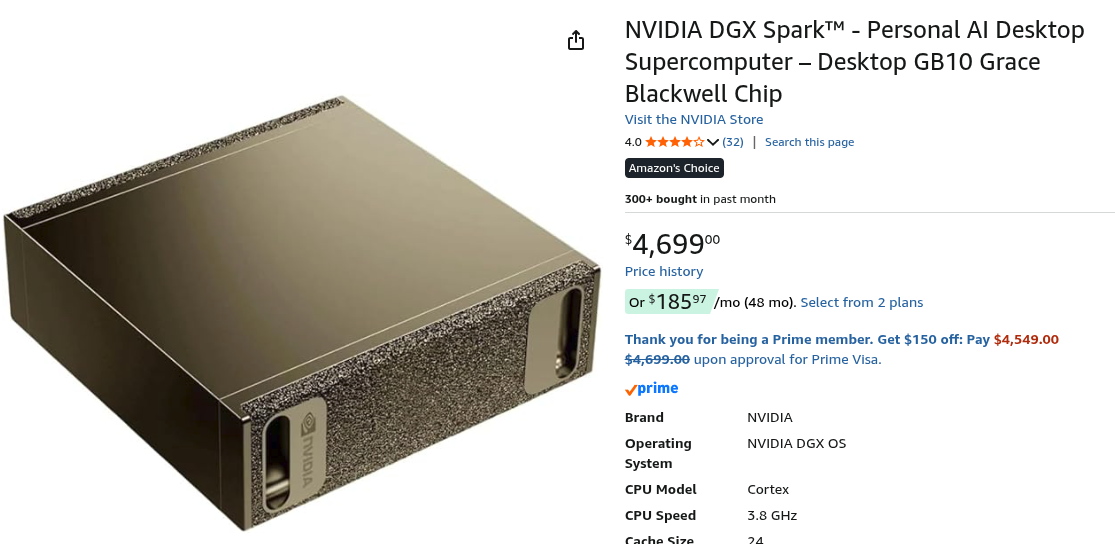
- The bottleneck every time is the slow speed of the PCIe bus. Without buying very high-end servers or a device with Unified Memory like the DGX Spark, you were priced out effectively. In reality 27B is a good minimum for a production level assistant. But it needed really a 48GB GPU no matter how you planned it - it was a $4 - $6000 build. Until now!
- Google published a paper on TurboQuant compression, and it theoretically allowed a model to run in significantly less ram up to the Shannon Theoretical Limit of Communication on a noisy channel. Effectively they could compress up to 600%!
- That suddenly implied the 27B would now fit on house GPUs!
 Sarah Perez
- The public raced off and of course using a SOTA level reasoning model themselves like Claud code - recoded their own models to accomodate this. By adding an additional 300% compression it became possible to run significantly larger models on smaller hardware - like house level GPU's. So here is our mileage on running Qwen3.5 27B model on a single 4080 with 16GB ram that we bought off facebook marketplace for $800.
Patience. You will need the very latest of a lot of stuff so be comfortable upgrading everything..
Note: This process can be messy. You might find yourself doing it a few times until you figure out all the moving parts and all the required versions. Really TurboQuant is SOTA 2026! We spent dozens of iterations with a SOTA level Grok 4 trying to make this work. Once we had what worked - we wrote this guide!
0. Basics, get all your basic stuff installed.
sudo apt install build-essential cmake python3 wget git- You will need the latest nvcc / cuda toolkit..

wget https://developer.download.nvidia.com/compute/cuda/13.2.0/local_installers/cuda-repo-debian13-13-2-local_13.2.0-595.45.04-1_amd64.deb
sudo dpkg -i cuda-repo-debian13-13-2-local_13.2.0-595.45.04-1_amd64.deb
sudo cp /var/cuda-repo-debian13-13-2-local/cuda-*-keyring.gpg /usr/share/keyrings/
sudo apt-get update
sudo apt-get -y install cuda-toolkit-13-2
You should be able to prove you are there with something in this range of nvcc:
- nvcc is the compiler for the GPU, like gcc or g++
c@dragon-192-168-1-3:~$ nvcc --version
nvcc: NVIDIA (R) Cuda compiler driver
Copyright (c) 2005-2026 NVIDIA Corporation
Built on Mon_Mar_02_09:52:23_PM_PST_2026
Cuda compilation tools, release 13.2, V13.2.51
Build cuda_13.2.r13.2/compiler.37434383_0
2. You actually need the very latest cmake, so:
wget https://github.com/Kitware/CMake/releases/download/v4.3.1/cmake-4.3.1-linux-x86_64.sh
chmod +x ./cmake-4.3.1-linux-x86_64.sh
./cmake-4.3.1-linux-x86_64.sh- This just un-compresses. You may need to then copy your bin files to /usr/bin or make a ln (symbolic link)
cd cmake-4.3.1-linux-x86_64/bin
sudo cp * /usr/bin
Once you are there (however you get there):
c@dragon-192-168-1-3:~/PythonProject/TurboResearcher2/cmake/cmake-4.3.1-linux-x86_64/bin$ cmake --version
cmake version 4.3.0

CMake suite maintained and supported by Kitware (kitware.com/cmake).
3. You will need the latest llama.cpp (with TurboQuant), compiled specifically with nvcc compiler setup..
git clone https://github.com/TheTom/llama-cpp-turboquant.git
cd llama-cpp-turboquant- It will need to be built with special options explicit for nvcc otherwise it thinks you are just compiling it for the CPU, so make a script inside your llama-cpp-turboquant directory:
nano install_script.sh- Put inside it:
cmake -B build \
      -DLLAMA_CUDA=ON \
      -DCMAKE_CUDA_COMPILER=/usr/local/cuda-13.2/bin/nvcc \
      -DCUDAToolkit_ROOT=/usr/local/cuda-13.2 \
      -DCMAKE_CUDA_ARCHITECTURES=89 \
      -DCMAKE_BUILD_TYPE=Release
cmake --build build --config Release -j$(nproc)- Make it executable and run it:
chmod +x ./install_script.sh
./install_script.sh
Wait 15 Minutes for Compiled Soup..
Inside the llama-cpp-turboquant directory will be a /build/bin like this:
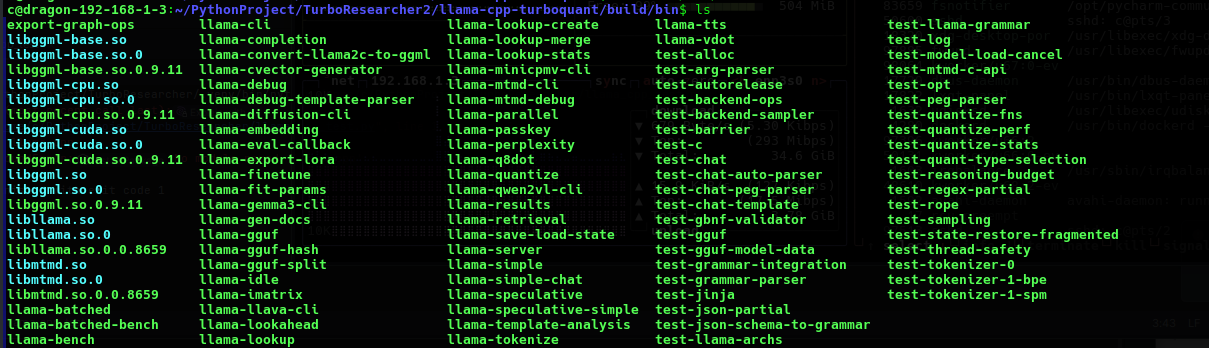
We copied all the files to /usr/bin:
sudo cp * /usr/bin/By this point you should see llama-cli and it sees your GPU:
c@dragon-192-168-1-3:~/PythonProject/TurboResearcher/scripts$ llama-cli --version
ggml_cuda_init: found 1 CUDA devices (Total VRAM: 15910 MiB):
Device 0: NVIDIA GeForce RTX 4080, compute capability 8.9, VMM: yes, VRAM: 15910 MiB
version: 8793 (bc05a6803)
built with GNU 11.4.0 for Linux x86_64
4. Downloading the Model (Qwen3.5-27B-TQ3_1S)
- At this point you are almost ready - but you actually need to download the model so, we will need the hf module from hugging_face:
pip install hugging_face[cli]- This might ask for many other packages so whatever it says it needs pip install it..
This is how the typical install went
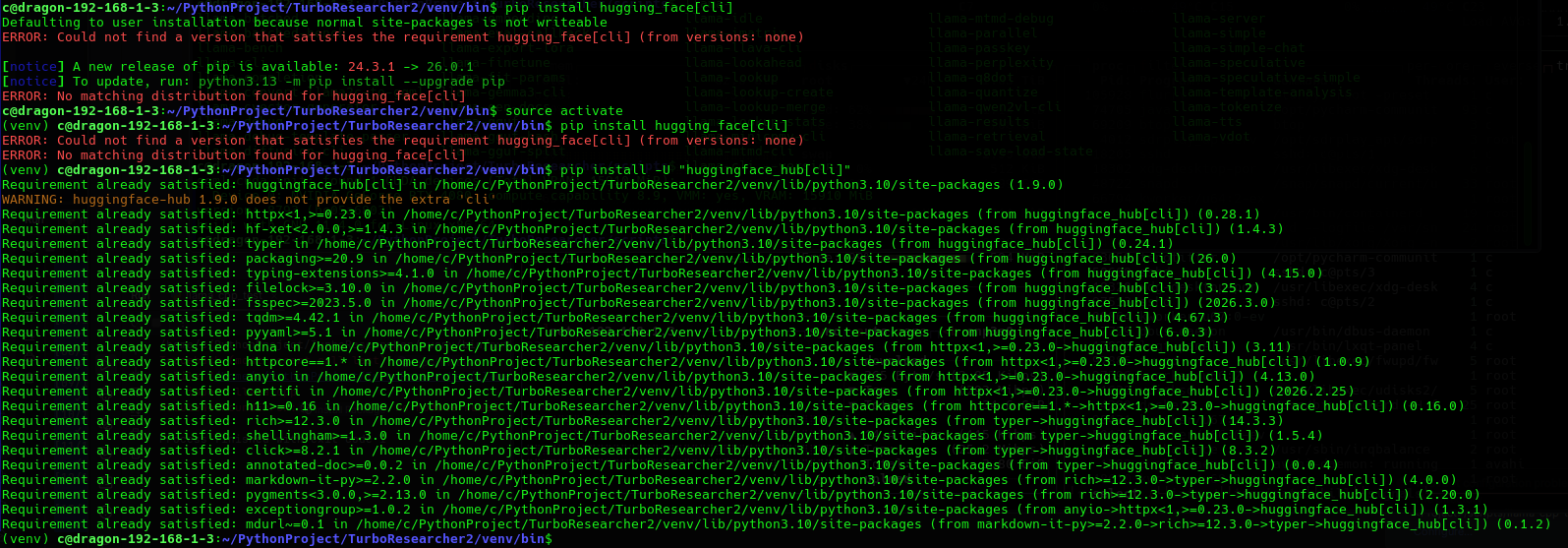
Once we have proved it we can then pull the model with:
hf auth loginAnd you can download the model with:
hf download \
  YTan2000/Qwen3.5-27B-TQ3_1S \
  Qwen3.5-27B-TQ3_1S.gguf \
  --local-dir ./models
14GB Download - it will take a while..
Qwen3.5-27B-TQ3_1S.gguf: 13%|███████████████████▏ 5. Running the llama-cli:
- Because we are passing a large number of parameters to the custom llama-cli we will need to set up one last script.
- We had to set explicit directory refrences as in:
/usr/bin/llama-cli -m /home/c/PythonProject/TurboResearcher/models/Qwen3.5-27B-TQ3_1S.gguf --n-gpu-layers -1 --flash-attn on --cache-type-k q8_0 --cache-type-v turbo3 -c 8192 --temp 0.7 -p "Your prompt here"Example output:
(venv) c@dragon-192-168-1-3:~/PythonProject/TurboResearcher/models$ ./run_qwen_turbo_quant.sh
ggml_cuda_init: found 1 CUDA devices (Total VRAM: 15910 MiB):
Device 0: NVIDIA GeForce RTX 4080, compute capability 8.9, VMM: yes, VRAM: 15910 MiB

Loading model...


▄▄ ▄▄
██ ██
██ ██  ▀▀█▄ ███▄███▄  ▀▀█▄    ▄████ ████▄ ████▄
██ ██ ▄█▀██ ██ ██ ██ ▄█▀██    ██    ██ ██ ██ ██
██ ██ ▀█▄██ ██ ██ ██ ▀█▄██ ██ ▀████ ████▀ ████▀
██    ██
▀▀    ▀▀

build      : b8793-bc05a6803
model      : Qwen3.5-27B-TQ3_1S.gguf
modalities : text

available commands:
/exit or Ctrl+C     stop or exit
/regen              regenerate the last response
/clear              clear the chat history
/read <file>        add a text file
/glob <pattern>     add text files using globbing pattern


> Your prompt here

[Start thinking]
Okay, the user provided a prompt that says "Your prompt here". Hmm, that seems a bit confusing. Let me think.
Some statistics after the prompt runs:
[ Prompt: 16.7 t/s | Generation: 13.5 t/s ]

> /exit


Exiting...
llama_memory_breakdown_print: | memory breakdown [MiB] | total   free     self   model   context   compute    unaccounted |
llama_memory_breakdown_print: |   - CUDA0 (RTX 4080)   | 15910 = 1877 + (13446 = 12615 +     335 +     495) +         585 |
llama_memory_breakdown_print: | - Host | 642 = 606 + 0 + 36 |- We tried 16384 tokens (-c 16384) - Good.
- We tried 32768 tokens (-c 32768) - Good!
- Typically we were getting about [Prompt 16.6 t/s | Generation: 13.5 t/s] Decent!
We pass back to Grok 4 to explain the above command :
Detailed Explanation of the llama-cli Command
The command you provided executes inference using the llama-cli binary from the TurboQuant fork of llama.cpp (turbo-tan/llama.cpp-tq3 or a compatible build). It loads the Qwen3.5-27B-TQ3_1S model and generates a response with GPU acceleration and TurboQuant KV cache compression enabled.
Below is a precise, flag-by-flag breakdown of every option in the command, including its purpose, syntax, effect on performance/memory, and relevance to your RTX 4080 16 GB setup.
/usr/bin/llama-cli
The executable binary that performs command-line inference. This is the compiled llama-cli tool from the TurboQuant fork. It supports the TQ3_1S model weights and the TurboQuant KV cache types used later in the command.
-m /home/c/PythonProject/TurboResearcher/models/Qwen3.5-27B-TQ3_1S.gguf (full form: --model <path>)
Specifies the absolute path to the GGUF model file.
- This loads the 3.5-bit TurboQuant-quantized Qwen3.5-27B model (~13.9 GB).
- The model must already be present at this location; the binary cannot download it.
--n-gpu-layers -1 (short form: -ngl -1)
Controls the number of model layers offloaded to the GPU.
- Value
-1instructs the engine to offload all possible layers to the GPU. - On an RTX 4080 this maximizes inference speed by keeping nearly the entire model in VRAM. Partial offloading (positive numbers) would be used only if VRAM constraints arise.
--flash-attn on (short form: -fa on or -fa 1)
Enables FlashAttention, a highly optimized attention algorithm.
- It reduces memory bandwidth usage and improves both speed and memory efficiency during attention computation.
- Strongly recommended for all modern NVIDIA GPUs; it is essential when using long contexts or large models such as 27B.
--cache-type-k q8_0 (short form: -ctk q8_0)
Sets the data type (quantization format) for the Key portion of the KV cache.
q8_0applies 8-bit quantization to the keys.- This reduces KV cache memory footprint by approximately 2× compared with the default FP16 while preserving high quality. It is the recommended pairing for TurboQuant value cache in this fork.
--cache-type-v turbo3 (short form: -ctv turbo3)
Sets the data type for the Value portion of the KV cache.
turbo3(also referred to asturbo3_0in some builds) is the TurboQuant-specific compression format.- It applies ~3-bit-per-value compression (approximately 4–5× smaller than FP16) with near-lossless quality.
- This option is exclusive to the TurboQuant fork and is the primary reason a 27B model can run comfortably with extended context on 16 GB VRAM. It works in tandem with
--cache-type-k q8_0.
-c 8192 (full form: --ctx-size 8192 or --context 8192)
Defines the maximum context length in tokens.
- The model can process up to 8192 tokens of prompt + generated output combined.
- Thanks to the TurboQuant KV cache, this setting fits comfortably within your 16 GB VRAM; larger values (e.g., 32768) are possible with the same cache settings.
--temp 0.7 (full form: --temperature 0.7)
Controls the randomness of token sampling during generation.
- Range: 0.0 (completely deterministic) to 2.0 (highly creative).
- 0.7 is a balanced default that produces coherent yet slightly varied output, suitable for most reasoning and general tasks.
-p "Your prompt here" (full form: --prompt "Your prompt here")
Supplies the input text (prompt) that the model will respond to.
- The string inside the quotes is sent directly to the model for generation.
- For chat-style usage, you would typically include the full chat template (e.g.,
<|im_start|>user\n...\n<|im_end|>\n<|im_start|>assistant\n).
Overall Purpose and Optimization Strategy
This command is carefully tuned for your hardware: full GPU offload, FlashAttention for speed, and asymmetric TurboQuant KV cache compression (q8_0 keys + turbo3 values) for minimal memory usage. The result is high-speed, high-quality reasoning with 8192-token context on an RTX 4080 16 GB GPU.
Note on Flag Naming
The TurboQuant fork accepts both turbo3 and turbo3_0 for the value cache (the exact alias depends on the exact commit you built). Your command uses the shorter form turbo3, which is valid in the build you are running.
If you would like an expanded version of the command that includes additional useful flags (e.g., --top-p, --repeat-penalty, --no-mmap, output length limits, or logging), or if you need help converting this into a Python llama-cpp-python equivalent, please provide further details.
Next up Part II: We look at llama-server and migrating this into a learning recursive LLM!
