ESP8266 C Example Code Reference
The ESP8266 Example C Code Reference

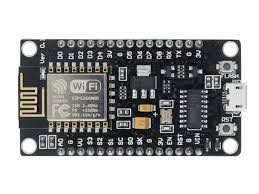
The ESP8266 is a Wi-Fi-enabled microcontroller commonly programmed using Espressif's Non-OS SDK (Non-Real-Time OS SDK) in C. The examples below use this SDK (non-RTOS variant, as it remains widely used for lightweight applications). All code assumes the standard Non-OS SDK structure:
- Include necessary headers (e.g.,
osapi.h,user_interface.h,gpio.h,pwm.h, etc.). - Place functional code in
user_main.c. - Use
os_printf()oros_printf_plus()for debug output (visible over UART0 at 115200 baud). - No file system is available by default in bare Non-OS SDK (SPIFFS or FAT can be added but requires extra configuration and flash space).
Compile and flash using the official Non-OS SDK toolchain (xtensa-lx106-elf-gcc) and esptool.py.
1. Drive a GPIO pin high/low at 1 ms intervals
This example toggles GPIO2 (common for onboard LED on many modules; active-low) every 1 ms using a software loop with os_delay_us().
#include "osapi.h"
#include "user_interface.h"
#include "gpio.h"

#define LED_GPIO 2

void ICACHE_FLASH_ATTR user_rf_pre_init(void) {}

void ICACHE_FLASH_ATTR user_init(void) {
    // Disable Wi-Fi to reduce power/interference if not needed
    wifi_set_opmode(STATION_MODE);
    wifi_station_disconnect();

    // Initialize GPIO subsystem
    gpio_init();

    // Set GPIO2 as output
    PIN_FUNC_SELECT(PERIPHS_IO_MUX_GPIO2_U, FUNC_GPIO2);
    GPIO_OUTPUT_SET(LED_GPIO, 1);  // Start high (LED off on most boards)

    os_printf("GPIO toggle example started\n");

    while (1) {
        GPIO_OUTPUT_SET(LED_GPIO, 0);  // Low → LED on
        os_delay_us(1000);             // 1 ms
        GPIO_OUTPUT_SET(LED_GPIO, 1);  // High → LED off
        os_delay_us(1000);
    }
}
Note: os_delay_us() is busy-wait; for better timing use os_timer or hardware timer callbacks.
2. Read ADC 20 times per second and append to a file
The ESP8266 has one 10-bit ADC channel (TOUT pin, 0–1 V range, or internal VDD/3 measurement mode). It supports single reads via system_adc_read() (~1–10 ksps typical in practice).
No built-in filesystem exists in the basic Non-OS SDK. Appending to a file requires enabling SPIFFS (or FAT) in the SDK build, which is non-trivial and consumes flash. For simplicity, this example reads the ADC at 20 Hz and outputs values over UART (viewable in a serial terminal). Replace with SPIFFS write if configured.
#include "osapi.h"
#include "user_interface.h"

static os_timer_t adc_timer;

static void ICACHE_FLASH_ATTR adc_callback(void *arg) {
    uint16_t adc_value = system_adc_read();  // 0–1023 (≈0–1 V on TOUT)
    os_printf("ADC: %u\n", adc_value);
}

void ICACHE_FLASH_ATTR user_rf_pre_init(void) {}

void ICACHE_FLASH_ATTR user_init(void) {
    // UART for output (115200 baud default)
    uart_div_modify(0, UART_CLK_FREQ / 115200);

    os_printf("ADC sampling example started\n");

    // Timer: 50 ms interval → 20 Hz
    os_memset(&adc_timer, 0, sizeof(os_timer_t));
    os_timer_disarm(&adc_timer);
    os_timer_setfn(&adc_timer, (os_timer_func_t *)adc_callback, NULL);
    os_timer_arm(&adc_timer, 50, 1);  // 50 ms, repeating
}
Note: For file logging, integrate spiffs library (available in some SDK forks) and use SPIFFS_open/SPIFFS_write. Without it, UART logging to a host PC is the standard approach.
3. PWM example with 5 different duty cycles
The ESP8266 Non-OS SDK provides a software-assisted PWM API (pwm.h) supporting up to 8 channels with ~1 kHz frequency and 45-step resolution per period (duty 0 to period×1000/45 max).
This example fades an LED on GPIO12 through five fixed duty cycles (0%, 25%, 50%, 75%, 100%) every 3 seconds.
#include "osapi.h"
#include "user_interface.h"
#include "pwm.h"

#define PWM_PERIOD    1000          // ≈1 kHz at default settings
#define PWM_CHANNEL   0             // Channel 0 → GPIO12 by default mapping
#define PWM_GPIO      12

uint32 pwm_duty_init[PWM_CHANNEL + 1] = {0};

void ICACHE_FLASH_ATTR user_rf_pre_init(void) {}

void ICACHE_FLASH_ATTR user_init(void) {
    uint32 io_info[][3] = {{PWM_0_OUT_IO_MUX, PWM_0_OUT_FUNC, PWM_0_OUT_PIN}};
    uint32 pwm_init_param = PWM_PERIOD;

    // Initialize PWM (software timer based)
    pwm_init(pwm_init_param, pwm_duty_init, 1, io_info);
    pwm_start();

    os_printf("PWM example started\n");

    const uint16_t duties[] = {0, 250, 500, 750, 1000};  // Approx 0%,25%,50%,75%,100% (max duty ≈1000)

    while (1) {
        for (int i = 0; i < 5; i++) {
            pwm_set_duty(duties[i], PWM_CHANNEL);
            pwm_start();  // Apply change
            os_printf("Duty: %u / %u\n", duties[i], PWM_PERIOD);
            os_delay_us(3000000);  // 3 seconds per step
        }
    }
}
Note: PWM uses a software timer; frequency ≈45 kHz / period. Max duty is limited (e.g., period×1000/45). For better performance, consider hardware timer + bit-banging or external libraries.
4. Output to serial port (UART)
The ESP8266 has two UARTs: UART0 (TXD0/GPIO1, RXD0/GPIO3 – default debug console) and UART1 (TXD1/GPIO2 – TX-only).
This example outputs counter values to UART0.
#include "osapi.h"
#include "user_interface.h"

void ICACHE_FLASH_ATTR user_rf_pre_init(void) {}

void ICACHE_FLASH_ATTR user_init(void) {
    // UART0 already initialized by SDK at 115200 baud
    // uart_div_modify(0, UART_CLK_FREQ / 115200); // optional reconfigure

    uint32_t counter = 0;

    while (1) {
        os_printf("Counter: %u\n", counter++);
        os_delay_us(1000000);  // 1 second
    }
}
UART1 example (TX-only on GPIO2):
#include "osapi.h"
#include "driver/uart.h"   // Include driver/uart.h from SDK examples

void ICACHE_FLASH_ATTR user_init(void) {
    UART_ConfigTypeDef uart1_config;
    uart1_config.baud_rate = BIT_RATE_115200;
    uart1_config.data_bits = UART_WordLength_8b;
    uart1_config.parity    = UART_Parity_None;
    uart1_config.stop_bits = UART_StopBits_1;
    uart1_config.flow_ctrl = UART_HardwareFlowControl_None;
    uart_config(UART1, &uart1_config);

    uint32_t counter = 0;

    while (1) {
        uart_tx_one_char(UART1, 'C');
        uart_tx_one_char(UART1, 'n');
        uart_tx_one_char(UART1, 't');
        uart_tx_one_char(UART1, ':');
        uart_tx_one_char(UART1, ' ');
        // Simple number output (expand as needed)
        char buf[16];
        os_sprintf(buf, "%u\n", counter++);
        for (int i = 0; buf[i]; i++) uart_tx_one_char(UART1, buf[i]);

        os_delay_us(1000000);
    }
}
Note: No native USB CDC exists on ESP8266 (unlike ESP32-S2/S3); use UART-to-USB adapter for PC communication.
5. Clocks on the ESP8266 and how to read them
The ESP8266 has several clock domains:
- CPU clock — 80 MHz (default) or 160 MHz (overclock via
system_overclock()/system_update_cpu_freq()) - APB / System bus clock — Fixed at 80 MHz (independent of CPU clock)
- RTC clock — Low-power 32 kHz-ish internal clock for timers/deep-sleep
- REFCLK — 26 MHz crystal reference
- PLL-derived clocks — Used internally for Wi-Fi, peripherals (not directly user-readable)
- CCOUNT — 32-bit cycle counter (ticks at CPU frequency: 80M or 160M)
Reading is limited in Non-OS SDK:
- CPU frequency:
system_get_cpu_freq() - Cycle counter: Read special register via inline assembly
RSR(CCOUNT, reg) - RTC calibration:
system_rtc_clock_cali_proc()(for deep-sleep timing)
Example program:
#include "osapi.h"
#include "user_interface.h"

static uint32_t ICACHE_FLASH_ATTR get_ccount(void) {
    uint32_t ccount;
    __asm__ __volatile__("rsr %0, CCOUNT" : "=a" (ccount));
    return ccount;
}

void ICACHE_FLASH_ATTR user_rf_pre_init(void) {}

void ICACHE_FLASH_ATTR user_init(void) {
    uart_div_modify(0, UART_CLK_FREQ / 115200);

    os_printf("ESP8266 clock info example\n");

    while (1) {
        uint8_t cpu_freq = system_get_cpu_freq();           // 80 or 160
        uint32_t cycles = get_ccount();                     // CPU cycle counter

        // RTC calibration factor (us per RTC tick)
        float rtc_cali = system_rtc_clock_cali_proc() / 1024.0f;

        os_printf("CPU freq   : %u MHz\n", cpu_freq);
        os_printf("CCOUNT     : %u\n", cycles);
        os_printf("RTC cali   : %.3f us/tick\n", rtc_cali);

        os_delay_us(2000000);  // 2 seconds
    }
}
Notes:
- Default CPU is 80 MHz; call
system_overclock()for 160 MHz (increases power and heat). - CCOUNT wraps every ~53 s at 80 MHz.
- No direct API exists for all internal PLL/peripheral clocks.
If you require RTOS SDK variants, SPIFFS integration, or specific module pin mappings (e.g., NodeMCU), please provide additional details.
