Docker Modularization: Creating a rpi2040 pico-sdk in a Docker Container
We go over making a modular docker container that can hold a pico-sdk and build environment!

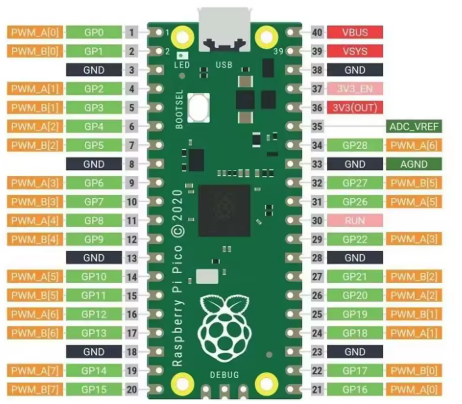
In this guide, we went into the meaty details of setting up a working and complete pico-sdk for the RPI2040, a powerful small micro-controller.
- There are a lot of moving parts, installation of the software, installation of the pico-sdk, setting up the CMakeLists.txt that actually works, and then getting a successful compilation from our working directory.
- What would be nice is to convert a docker container into a modular program that will do all this from the command line. There are a lot of moving parts, but the basic premise is this can then become useful for any software or application, it is a foundational knowledge.
The Plan
- Build a working Dockerfile that containerizes everything we will need into a working image.
- Test that the running Docker container from ils
- ts built image that it can make pico-sdk files
- Build a wrapper script around the Docker container that will spin it up to do it's work and then stand down again.
- Make small steps. Add to your configuration, test, repeat. When this was written you are seeing the end result of multiple cycles of adding, tweaking amending the Dockerfile because things would be discovered that were needed down the line.
- You are doing multiple CMakeLists.txt - one for the pico-sdk which will be compiled by itself, one for the Picotool, then finally the project that you are trying to compile will need to link back to the pico-sdk which will require a ENV command inside your Dockerfile, or be set by the ENTRYPOINT or at some other place.
Step 1: Building a working Dockerfile with a full pico-sdk / picotool
- It will need a script on the inside that will handle the container passed parameters at run-time, and for this quite a bit of stuff is needed, this is what worked for us in the end:
- It needs a complete pico-sdk plus picotool as the default doe not have USB Support..?
FROM debian:stable-slim
RUN apt-get update -y
RUN apt-get install -y --no-install-recommends cmake gcc-arm-none-eabi libnewlib-arm-none-eabi build-essential libstdc++-arm-none-eabi-newlib
RUN apt-get install -y --no-install-recommends git ca-certificates python3 picotool nano
WORKDIR /opt/build
RUN git clone https://github.com/raspberrypi/pico-sdk.git
WORKDIR /opt/build/pico-sdk
RUN git submodule update --init --recursive
RUN cmake .
RUN make all
ENV PICO_SDK_PATH=/opt/build/pico-sdk
# Because picotool does not have usb support by default. Build new
WORKDIR /picotool
RUN git clone https://github.com/raspberrypi/picotool
WORKDIR /picotool/picotool/build
RUN cmake ..
RUN make
WORKDIR /IN
WORKDIR /OUT
WORKDIR /
COPY entrypoint.sh /entrypoint.sh
RUN chmod +x /entrypoint.sh
ENTRYPOINT ["/entrypoint.sh"]
Inside entrypoint.sh we put:
#!/bin/sh
echo "Processing indirectory: $1"
cd IN
cmake .
make
cp *.elf /OUT
cp *.uf2 /OUT
tail -f /dev/null
docker build .Once we have that done, and this did compile for us, we looked at tagging it:
docker image tag e8efa67c4c59 pico-sdkWhich shows up as:
docker image ls
REPOSITORY   TAG       IMAGE ID       CREATED          SIZE
pico-sdk     latest    e8efa67c4c59   4 minutes ago    4.49GB
<none>       <none>    15b8793c67b4   5 minutes ago    4.38GB
<none>       <none>    d1015bfd4632   13 minutes ago   3.73GB
<none>       <none>    eb0fea42fc83   14 minutes ago   3.69GB
<none>       <none>    d9d32b47196a   18 minutes ago   410MB
Testing.
Step 2: Passing the directory to the container..
- We want to effectively pass a IN holding our build files and a OUT which will hold the output compiled .uf2 .ef files (At least that is the goal)
- We have our entrypoint.sh script is being called, and it is seeing Parameter A and Parameter B at run time.
docker run --rm \
    -v IN:/IN \
    -v OUT:/OUT \
    pico-sdk
The structure that we want inside the INPUT_DIR is as follows:'
CMakeLists.txt
main.c
We will make a directory called 'IN' and 'OUT' Just to make this as simple as possible.
Inside the IN directory we make a CMakeLists.txt:
cmake_minimum_required(VERSION 3.13)

# After MUCH digging around to make your project compatible you need
# to do this.
include(/opt/build/pico-sdk/pico_sdk_init.cmake)


# Initialize the Pico SDK
pico_sdk_init()

# Project name
project(rp2040_usb_key C CXX ASM)

# -------------------------------------------------
# Source files
# -------------------------------------------------
add_executable(${PROJECT_NAME} main.c)

# -------------------------------------------------
# Pull in Pico SDK and TinyUSB (USB CDC) support
# -------------------------------------------------
target_link_libraries(${PROJECT_NAME}
    pico_stdlib
    hardware_uart
    tinyusb_device
)

# Enable USB CDC (serial over USB) and set the USB device description
pico_enable_stdio_usb(${PROJECT_NAME} 1)   # redirects stdio to USB CDC
pico_set_stdio_uart(${PROJECT_NAME} 0)    # disable UART0 stdio (we use USB only)

# -------------------------------------------------
# Build options
# -------------------------------------------------
pico_set_program_name(${PROJECT_NAME} "rp2040_usb_key")
pico_add_extra_outputs(${PROJECT_NAME})
And then we add a source file: main.c
/**
 * rp2040_usb_key
 *
 * Listens on the USB CDC virtual COM port for the character 'r'.
 * When received, drives GPIO1 low for 1 second, then returns it high.
 * GPIO1 is kept high at all other times.
 */

#include <stdio.h>
#include "pico/stdlib.h"
#include "hardware/gpio.h"

// GPIO used for the output
#define OUTPUT_GPIO 1

int main() {
    // stdio over USB CDC is enabled by pico_enable_stdio_usb in CMakeLists.txt
    stdio_init_all();   // initializes USB CDC (and any other stdio)

    // Configure GPIO1 as a push‑pull output, start high
    gpio_init(OUTPUT_GPIO);
    gpio_set_dir(OUTPUT_GPIO, GPIO_OUT);
    gpio_put(OUTPUT_GPIO, 1);   // high

    printf("USB CDC ready. Send 'r' to pulse GPIO%d low for 1s.\n", OUTPUT_GPIO);

    while (true) {
        // Check if a byte is available on the USB CDC receive buffer
        if (stdio_usb_connected() && usb_cdc_getc_timeout(0) >= 0) {
            int ch = getchar();   // blocks only if data is present (we already checked)
            if (ch == 'r' || ch == 'R') {
                printf("Received '%c' – pulsing GPIO%d low for 1s.\n", ch, OUTPUT_GPIO);
                gpio_put(OUTPUT_GPIO, 0);   // drive low                sleep_ms(1000);             // hold low for 1 second
                gpio_put(OUTPUT_GPIO, 1);   // return high
                printf("GPIO%d returned high.\n", OUTPUT_GPIO);
            } else {
                // Ignore any other characters
                // Optional: uncomment to debug
                // printf("Ignored character: %c (0x%02x)\n", ch, (unsigned char)ch);
            }
        }
        // Small delay to avoid busy‑waiting; the USB stack still runs in the background
        sleep_ms(10);
    }
}
Now we want to modify our entrypoint.sh so that when these files are transferred across the volumes (-v) it automatically does the 'cmake .' and the 'make')
Problems
At this point we had real issues getting it to work where it sat, so suggested do this, set an entrypoint that effectively drops to cursor and build the image and run it that way, inside entrypoint.sh put:
tail -f /dev/nullAnd then rebuild the Dockerfile into an image and just run it.
- At this point we found out that we need to set the export path, it might not have been persisting, or set wrongly, but it also showed us - where are the .elf and .uf2 files going to?
