ATTiny C Example Program Reference
ATTiny C Example Program Reference

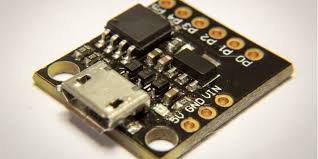
The ATtiny family refers to a series of low-power 8-bit AVR microcontrollers from Microchip (formerly Atmel). The most commonly referenced model in hobbyist and prototyping contexts is the ATtiny85 (8 KB Flash, 512 B SRAM, 512 B EEPROM, 6 I/O pins), which includes a 10-bit ADC, Timer0, Timer1 (with PWM support), and USI for serial protocols. Other variants (e.g., ATtiny13, ATtiny84, ATtiny45) differ in memory, pin count, peripherals, and clock options.
The examples below target the ATtiny85 compiled with AVR-GCC (e.g., via Arduino IDE with ATTinyCore by Spence Konde, or PlatformIO / avr-gcc directly). They use direct register access for clarity and portability.
Assume:
- F_CPU = 8000000UL (8 MHz internal oscillator, common default after fuse change)
- No bootloader (ISP programming via programmer like USBasp or Arduino as ISP)
#define F_CPU 8000000ULbefore including<avr/io.h>
1. Drive a GPIO pin high/low at 1 ms intervals
Toggles PB0 (physical pin 5) every 1 ms using busy-wait delay (approximate at 8 MHz).
#include <avr/io.h>
#include <util/delay.h>

#define LED_PIN     PB0

int main(void) {
    DDRB |= (1 << LED_PIN);         // PB0 as output

    while (1) {
        PORTB |=  (1 << LED_PIN);   // High
        _delay_ms(1);
        PORTB &= ~(1 << LED_PIN);   // Low
        _delay_ms(1);
    }

    return 0;
}
Note: _delay_ms() is cycle-accurate only when F_CPU is correctly defined. For higher precision, use Timer0 overflow interrupt.
2. Read ADC 20 times per second
The ATtiny85 has a 10-bit ADC with 4 single-ended channels (ADC0–3 on PB2–PB5, plus internal temperature sensor and 1.1 V reference).
No filesystem exists (no SD card or flash FAT in basic firmware). This example reads ADC2 (PB4 / physical pin 3) at 20 Hz and outputs values over a software serial implementation or debug LED pattern. Replace output with real UART if using software serial library.
#include <avr/io.h>
#include <util/delay.h>
#include <stdio.h>                  // Optional – requires retargeted putchar

void adc_init(void) {
    ADMUX  = (1 << REFS0);          // AVcc reference, right adjust, start with ADC0
    ADCSRA = (1 << ADEN) | (1 << ADPS2) | (1 << ADPS1) | (1 << ADPS0);  // Enable, prescaler 128 → ~62.5 kHz @ 8 MHz
}

uint16_t adc_read(uint8_t channel) {
    ADMUX = (ADMUX & 0xF0) | (channel & 0x0F);  // Select channel
    ADCSRA |= (1 << ADSC);                      // Start conversion
    while (ADCSRA & (1 << ADSC));               // Wait for completion
    return ADC;
}

int main(void) {
    adc_init();

    DDRB |= (1 << PB0);     // Optional: LED for debug

    while (1) {
        uint16_t value = adc_read(2);           // ADC2 = PB4

        // Output example: toggle LED fast if value > 512 (simple debug)
        if (value > 512) {
            PORTB |=  (1 << PB0);
        } else {
            PORTB &= ~(1 << PB0);
        }

        _delay_ms(50);                          // 20 Hz
    }
}
Hardware note: Connect analog signal (0–Vcc) to PB4. Use a voltage divider if input > Vcc or < 0.
3. PWM example with 5 different duty cycles
Timer1 (8-bit fast PWM mode) supports PWM on OC1A (PB1 / pin 6) and OC1B (PB4 / pin 3). This example uses OC1A at ~31 kHz (8 MHz / 256) and cycles through ≈0%, 25%, 50%, 75%, 100% duty.
#include <avr/io.h>
#include <util/delay.h>

int main(void) {
    // Fast PWM mode 5 (TOP = 0xFF), non-inverting on OC1A
    TCCR1 |= (1 << CTC1) | (1 << PWM1A);        // CTC + PWM on OC1A
    TCCR1 |= (1 << CS10);                       // Prescaler 1 → ~31.25 kHz @ 8 MHz
    GTCCR |= (1 << PWM1B);                      // Optional: enable OC1B if needed

    DDRB |= (1 << PB1);                         // PB1 (OC1A) as output

    uint8_t duties[] = {0, 64, 128, 192, 255};

    while (1) {
        for (uint8_t i = 0; i < 5; i++) {
            OCR1A = duties[i];                  // Set duty (0–255)
            _delay_ms(2000);                    // Hold 2 seconds
        }
    }
}
Note: For lower frequencies (e.g., 490 Hz like classic Arduino), set prescaler to 64: TCCR1 |= (1 << CS11) | (1 << CS10); and adjust OCR1A accordingly.
4. Output to serial port (software UART / USI)
No hardware UART exists on ATtiny85. Use software serial (bit-banging) or USI in UART mode for TX-only output.
Minimal software TX on PB0 (115200 baud, 8N1) example:
#include <avr/io.h>
#include <util/delay.h>

#define TX_PIN      PB0
#define BAUD        115200
#define BIT_DELAY   (F_CPU / BAUD / 8)  // Adjust for your F_CPU

void soft_serial_tx_byte(uint8_t byte) {
    // Start bit
    PORTB &= ~(1 << TX_PIN);
    _delay_loop_2(BIT_DELAY);

    // 8 data bits (LSB first)
    for (uint8_t i = 0; i < 8; i++) {
        if (byte & 1) {
            PORTB |= (1 << TX_PIN);
        } else {
            PORTB &= ~(1 << TX_PIN);
        }
        byte >>= 1;
        _delay_loop_2(BIT_DELAY);
    }

    // Stop bit
    PORTB |= (1 << TX_PIN);
    _delay_loop_2(BIT_DELAY);
}

int main(void) {
    DDRB |= (1 << TX_PIN);          // TX as output
    PORTB |= (1 << TX_PIN);         // Idle high

    uint32_t counter = 0;

    while (1) {
        char buf[16];
        // Simple integer to ASCII (expand as needed)
        buf[0] = '0' + (counter / 10000) % 10;
        buf[1] = '0' + (counter / 1000)  % 10;
        buf[2] = '0' + (counter / 100)   % 10;
        buf[3] = '0' + (counter / 10)    % 10;
        buf[4] = '0' + (counter % 10);
        buf[5] = '\n';
        buf[6] = 0;

        for (uint8_t *p = buf; *p; p++) {
            soft_serial_tx_byte(*p);
        }

        counter++;
        _delay_ms(1000);
    }
}
Note: Timing is approximate; use TinySoftSerial or ATTinyCore's built-in SoftwareSerial for better reliability. No native USB exists.
5. Clocks on the ATtiny85 and how to read them
The ATtiny85 clock system includes:
- CLKI / XTAL1 & XTAL2 — External crystal/ceramic resonator (up to 20 MHz)
- Calibrated Internal Oscillator — 8.0 MHz (±10% factory, tunable via OSCCAL), also 4/1 MHz versions via fuses
- PLL — 64 MHz (for Timer1 high-frequency PWM when CKSEL fuses set to PLL)
- Watchdog Oscillator — ~128 kHz (independent, for WDT)
- clk_IO — I/O clock (usually = system clock)
- clk_ADC — ADC clock (prescaled from system clock, 50–200 kHz recommended)
- clk_CPU — CPU clock (same as system clock after prescaler)
No direct frequency counter register exists. Read via:
OSCCAL— Calibration value for internal oscillator- Fuse bits (via avrdude or programmer) — Determine source (CKSEL3..0) and prescaler (CKDIV8)
- Runtime: infer from known F_CPU and measured timing
Example printing OSCCAL and basic status (output via software serial above):
#include <avr/io.h>
#include <util/delay.h>

// Assume soft_serial_tx_byte() from section 4

int main(void) {
    DDRB |= (1 << PB0);
    PORTB |= (1 << PB0);

    uint8_t original_osccal = OSCCAL;

    while (1) {
        char buf[32];
        // Very basic hex to string
        buf[0] = 'O';
        buf[1] = 'S';
        buf[2] = 'C';
        buf[3] = 'C';
        buf[4] = 'A';
        buf[5] = 'L';
        buf[6] = ':';
        buf[7] = ' ';
        buf[8] = '0' + (OSCCAL >> 4);
        buf[9] = (OSCCAL & 0x0F) < 10 ? '0' + (OSCCAL & 0x0F) : 'A' + (OSCCAL & 0x0F) - 10;
        buf[10] = '\n';
        buf[11] = 0;

        for (char *p = buf; *p; p++) soft_serial_tx_byte(*p);

        // Optional: tune OSCCAL and show effect (demo only)
        OSCCAL = original_osccal + 10;
        _delay_ms(2000);

        OSCCAL = original_osccal;
        _delay_ms(2000);
    }
}
Typical defaults (after programming with 8 MHz internal fuse setting):
- System clock ≈ 8 MHz
- OSCCAL ≈ 0x8F–0xA0 range (factory calibrated)
For precise frequency measurement, connect an external frequency counter or use Timer1 as a counter with known external reference.
If you are targeting a different ATtiny model (e.g., ATtiny13, ATtiny84, ATtiny13A), require Arduino IDE compatibility, or need examples with specific fuse settings, please provide additional details.
