Ardiuino Nano C Example Program Reference
Arduino Nano C Example Program Reference

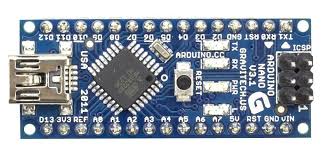
The Arduino Nano (classic versions, most commonly encountered) is based on the ATmega328P microcontroller (8-bit AVR architecture). It operates at 16 MHz using an external ceramic resonator or crystal connected to XTAL1/XTAL2 pins. The board features:
- 14 digital I/O pins (6 with hardware PWM support)
- 8 analog input channels (10-bit ADC)
- 1 UART (pins D0/RX, D1/TX)
- 32 KB Flash (2 KB used by bootloader), 2 KB SRAM, 1 KB EEPROM
All example programs below are written in C using the Arduino core library (compatible with the Arduino IDE or PlatformIO). They assume standard Arduino Nano wiring and compilation settings (Tools → Board → Arduino Nano, Processor → ATmega328P).
1. Drive a GPIO pin high/low at 1 ms intervals
This toggles digital pin 13 (onboard LED) every 1 millisecond using the built-in delay function.
void setup() {
  pinMode(13, OUTPUT);          // Pin 13 as output
}

void loop() {
  digitalWrite(13, HIGH);
  delay(1);                     // 1 ms
  digitalWrite(13, LOW);
  delay(1);
}
Note: delay(1) provides millisecond resolution with acceptable accuracy at 16 MHz.
2. Read analog-to-digital converter 20 times per second
The ATmega328P includes an 8-channel 10-bit ADC (0–1023 range, default reference = AVcc = 5 V). No native filesystem exists on the microcontroller. File appending requires external storage (e.g., SD card module via SPI), which is not covered in basic examples.
This program reads analog pin A0 at 20 Hz and sends values over the USB serial port (visible in Serial Monitor at 115200 baud).
void setup() {
  Serial.begin(115200);         // USB serial at 115200 baud
  analogReference(DEFAULT);     // AVcc reference (5 V)
}

void loop() {
  int value = analogRead(A0);   // Read A0 (0–1023)
  Serial.print("ADC A0: ");
  Serial.println(value);
  delay(50);                    // 50 ms interval → 20 samples/second
}
Hardware note: Connect analog signal (0–5 V) to A0. Use a voltage divider for higher voltages.
3. PWM example with 5 different duty cycles
Hardware PWM is available on pins 3, 5, 6, 9, 10, 11 (Timer0, Timer1, Timer2). This example uses pin 9 (~490 Hz default frequency) and cycles through approximate 0%, 25%, 50%, 75%, 100% duty cycles.
void setup() {
  pinMode(9, OUTPUT);           // PWM-capable pin
}

void loop() {
  int duties[] = {0, 64, 128, 192, 255};  // 0–255 range (8-bit resolution)

  for (int i = 0; i < 5; i++) {
    analogWrite(9, duties[i]);
    Serial.begin(115200);
    Serial.print("Duty cycle: ");
    Serial.print(duties[i] * 100 / 255);
    Serial.println("%");
    delay(2000);                // Hold each duty for 2 seconds
  }
}
Note: Default PWM frequency is ~490 Hz on most pins. For custom frequencies, use Timer registers directly (advanced).
4. Output to serial port (USB virtual COM port)
The ATmega328P has one hardware UART (USART), mapped to pins D0 (RX) and D1 (TX). On the Nano, this connects to the onboard USB-to-serial converter (usually CH340 or FTDI), appearing as a virtual COM port on the host PC.
void setup() {
  Serial.begin(115200);         // Initialize USB serial
}

void loop() {
  static uint32_t counter = 0;

  Serial.print("Counter: ");
  Serial.println(counter++);

  delay(1000);                  // 1 second interval
}
Alternative (physical UART without USB, e.g., to another device):
- Use
Serial1if available (not on Nano) or the sameSerialobject after disconnecting USB. - Baud rate must match the receiving device.
5. Clocks on the ATmega328P (Arduino Nano) and how to read them
The ATmega328P clock system includes several sources and domains:
- External crystal/ceramic resonator — 16 MHz on standard Nano boards (connected to XTAL1/XTAL2)
- Calibrated internal RC oscillator — 8 MHz nominal (factory calibrated, can be selected via fuses)
- 128 kHz internal RC oscillator — Used mainly for watchdog timer
- System clock (clk_CPU / clk_IO / clk_FLASH) — Derived from selected source, optionally divided by prescaler (1, 2, 4, ..., 256) via CLKPR register
- ADC clock — Prescaled from system clock (typically 125–200 kHz for best accuracy)
- Timer clocks — Derived from system clock with separate prescalers
- Asynchronous timer clock (Timer2) — Can use 32.768 kHz crystal (not populated on Nano)
No direct runtime frequency measurement register exists. The active clock source and prescaler are set by fuse bits (determined at programming) and the CLKPR register (runtime prescaler).
- F_CPU macro — Compile-time constant (usually 16000000UL on Nano)
- CLKPR register — Runtime clock prescaler
- Practical verification — Use
millis()timing against a stopwatch or output a known-frequency signal and measure with an oscilloscope
Example program that reports assumed system clock and applies a prescaler (for demonstration):
void setup() {
  Serial.begin(115200);
  Serial.println("ATmega328P clock information");
}

void loop() {
  // Compile-time assumed frequency
  Serial.print("F_CPU (compile-time): ");
  Serial.print(F_CPU / 1000000UL);
  Serial.println(" MHz");

  // Current prescaler value from CLKPR
  uint8_t prescaler = CLKPR & 0x0F;
  uint32_t current_freq = F_CPU >> prescaler;

  Serial.print("Current prescaler: 1/");
  Serial.print(1 << prescaler);
  Serial.print(" → approx. ");
  Serial.print(current_freq / 1000000UL);
  Serial.println(" MHz (assuming no fuse division)");

  // Optional: set temporary prescaler (example: divide by 8)
  // CLKPR = 0x80;           // Enable prescaler change
  // CLKPR = 0x03;           // Divide by 8
  // (then revert if needed)

  delay(3000);
}
Typical values on standard Arduino Nano:
- Active clock source: external 16 MHz resonator/crystal
- Prescaler: 1 (CLKPR = 0x00)
- Effective system clock: 16 MHz
- To verify actual frequency: run a tight loop toggling a pin and measure with oscilloscope, or compare
millis()elapsed time against real-world seconds.
Important: If the board was programmed with different fuses (e.g., 8 MHz internal oscillator), F_CPU must match the actual clock in boards.txt or platformio.ini, or timing functions (delay, millis, PWM frequency, etc.) will be incorrect.
If your Arduino Nano uses a different variant (e.g., Nano Every, Nano 33 IoT, Nano ESP32, Nano R4), or if you require bare-metal register-level examples without the Arduino framework, please provide clarification for adjusted code.
