Agentic Server Primer: Llama.cpp MCP Lesson 1: A Calculator.
Agentic Server Primers: Llama.cpp MCP Lession 1: A Calculator

Agentic refers to the ability to act independently and achieve outcomes through self-directed action.
- You enable this in your HouseLLM by giving it tools. If you need to build a fast, effective and comprehensive home based HouseLLM follow this guide (please note - not every LLM supports tools..)
 thinkmeltprotonmail.com
- Once you have a working HouseLLM we are going to go over giving it tools, but the key is to start basic - a calculator it can use to check its work. After that you simply ask it, and as long as the tool is properly named it will automatically go off and use it.
- We are applying this in the context of a Llama.cpp configuration using CORS, it sounds complex and there is a lot of moving parts, but for all effects the process is simple.
- You may not see these options with a online service, this guide is designed for your HouseLLM
Llama.cpp MCP Plugin Point (192.168.1.3:8080)
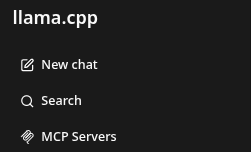
- At the top left is your settings for MCP Servers.
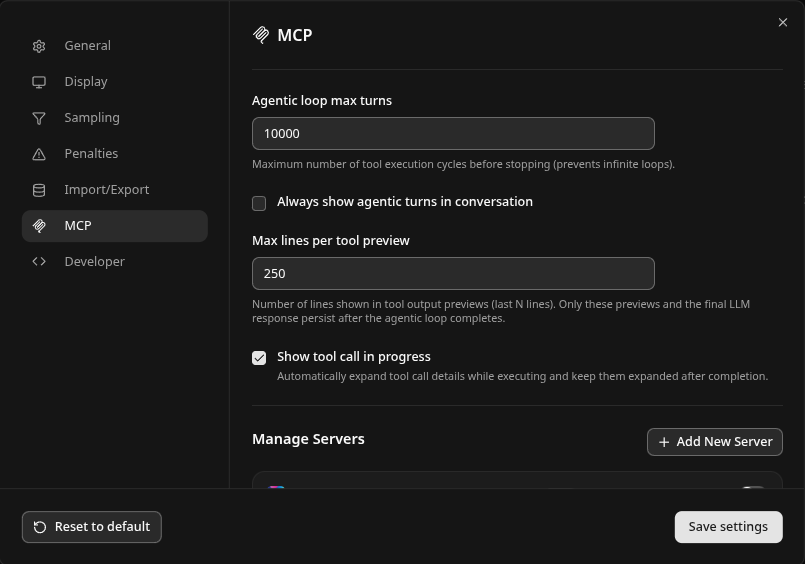
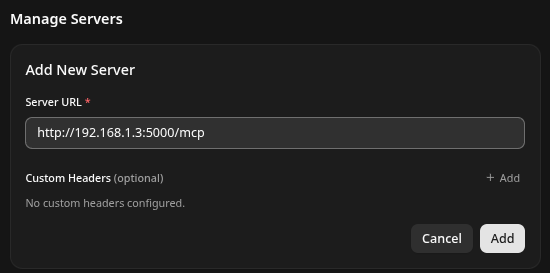
- Add New Server. Note /mcp is expected. Give it http://192.168.1.3:5000/mcp which we will get our python code to match.
- Now setup your pycharm / python and create a venv and a program that has the following. If you need our Easy Bake Oven Recipe Guide for installing that stuff just follow it here:
 thinkmeltprotonmail.com
- name it mcp_a_calculator.py put the following into it:
from fastmcp import FastMCP
from starlette.middleware import Middleware
from starlette.middleware.cors import CORSMiddleware
import uvicorn
import math

mcp = FastMCP(name="Advanced Mathematics MCP Server")

# ── Basic Arithmetic ─────────────────────────────────────────────────────
@mcp.tool
def add(a: float, b: float) -> float:
    """Adds two numbers and returns the result."""
    return a + b

@mcp.tool
def subtract(a: float, b: float) -> float:
    """Subtracts b from a and returns the result."""
    return a - b

@mcp.tool
def multiply(a: float, b: float) -> float:
    """Multiplies two numbers and returns the result."""
    return a * b

@mcp.tool
def divide(a: float, b: float) -> float:
    """Divides a by b and returns the result. Raises ValueError on division by zero."""
    if b == 0:
        raise ValueError("Cannot divide by zero")
    return a / b

# ── Powers and Roots ─────────────────────────────────────────────────────
@mcp.tool
def power(base: float, exponent: float) -> float:
    """Returns base raised to the power of exponent."""
    return math.pow(base, exponent)

@mcp.tool
def sqrt(x: float) -> float:
    """Returns the square root of x."""
    return math.sqrt(x)

# ── Trigonometric Functions (radians) ───────────────────────────────────
@mcp.tool
def sin(x: float) -> float:
    """Returns the sine of x (radians)."""
    return math.sin(x)

@mcp.tool
def cos(x: float) -> float:
    """Returns the cosine of x (radians)."""
    return math.cos(x)

@mcp.tool
def tan(x: float) -> float:
    """Returns the tangent of x (radians)."""
    return math.tan(x)

@mcp.tool
def asin(x: float) -> float:
    """Returns the arc sine of x."""
    return math.asin(x)

@mcp.tool
def acos(x: float) -> float:
    """Returns the arc cosine of x."""
    return math.acos(x)

@mcp.tool
def atan(x: float) -> float:
    """Returns the arc tangent of x."""
    return math.atan(x)

@mcp.tool
def atan2(y: float, x: float) -> float:
    """Returns the arc tangent of y/x, using the signs of both to determine the quadrant."""
    return math.atan2(y, x)

# ── Hyperbolic Functions ─────────────────────────────────────────────────
@mcp.tool
def sinh(x: float) -> float:
    """Returns the hyperbolic sine of x."""
    return math.sinh(x)

@mcp.tool
def cosh(x: float) -> float:
    """Returns the hyperbolic cosine of x."""
    return math.cosh(x)

@mcp.tool
def tanh(x: float) -> float:
    """Returns the hyperbolic tangent of x."""
    return math.tanh(x)

# ── Logarithms and Exponentials ──────────────────────────────────────────
@mcp.tool
def log(x: float, base: float = math.e) -> float:
    """Returns the logarithm of x to the given base (natural log by default)."""
    return math.log(x, base)

@mcp.tool
def log10(x: float) -> float:
    """Returns the base-10 logarithm of x."""
    return math.log10(x)

@mcp.tool
def log2(x: float) -> float:
    """Returns the base-2 logarithm of x."""
    return math.log2(x)

@mcp.tool
def exp(x: float) -> float:
    """Returns e raised to the power of x."""
    return math.exp(x)

# ── Rounding and Integer Functions ───────────────────────────────────────
@mcp.tool
def floor(x: float) -> float:
    """Returns the largest integer less than or equal to x."""
    return math.floor(x)

@mcp.tool
def ceil(x: float) -> float:
    """Returns the smallest integer greater than or equal to x."""
    return math.ceil(x)

@mcp.tool
def abs_val(x: float) -> float:
    """Returns the absolute value of x."""
    return math.fabs(x)

# ── Combinatorial & Other Useful Functions ───────────────────────────────
@mcp.tool
def factorial(n: int) -> int:
    """Returns the factorial of a non-negative integer n."""
    return math.factorial(n)

@mcp.tool
def gcd(a: int, b: int) -> int:
    """Returns the greatest common divisor of a and b."""
    return math.gcd(a, b)

@mcp.tool
def lcm(a: int, b: int) -> int:
    """Returns the least common multiple of a and b."""
    return math.lcm(a, b)

@mcp.tool
def comb(n: int, k: int) -> int:
    """Returns the number of ways to choose k items from n items without repetition."""
    return math.comb(n, k)

@mcp.tool
def perm(n: int, k: int) -> int:
    """Returns the number of ways to choose k items from n items with order mattering."""
    return math.perm(n, k)

# ── General-Purpose Evaluator (covers virtually any mathematical function) ─
@mcp.tool
def evaluate_math(expression: str) -> str:
    """Evaluates any valid mathematical expression using safe evaluation.
    Supports all standard functions (sin, cos, tan, log, sqrt, pow, pi, e, etc.).
    Example: 'sin(pi/2) + 3 * log(10) + sqrt(25) + 2**4'"""
    safe_dict = {
        "sin": math.sin, "cos": math.cos, "tan": math.tan,
        "asin": math.asin, "acos": math.acos, "atan": math.atan, "atan2": math.atan2,
        "sinh": math.sinh, "cosh": math.cosh, "tanh": math.tanh,
        "log": math.log, "log10": math.log10, "log2": math.log2,
        "exp": math.exp, "sqrt": math.sqrt, "pow": math.pow,
        "floor": math.floor, "ceil": math.ceil, "abs": abs,
        "pi": math.pi, "e": math.e, "tau": math.tau,
        "factorial": math.factorial, "gcd": math.gcd, "lcm": math.lcm,
    }
    try:
        result = eval(expression, {"__builtins__": {}}, safe_dict)
        return str(result)
    except Exception as e:
        return f"Error: {str(e)}"

# ── Server Startup with CORS (required for llama.cpp frontend) ────────────
if __name__ == "__main__":
    middleware = [
        Middleware(
            CORSMiddleware,
            allow_origins=["*"],          # Restrict in production
            allow_credentials=True,
            allow_methods=["GET", "POST", "OPTIONS"],
            allow_headers=["*"],
            expose_headers=["*"],
        )
    ]

    app = mcp.http_app(
        path="/mcp",
        middleware=middleware
    )

    uvicorn.run(
        app,
        host="0.0.0.0",
        port=5000,
        log_level="info"
    )
And when you run it - it should look like:
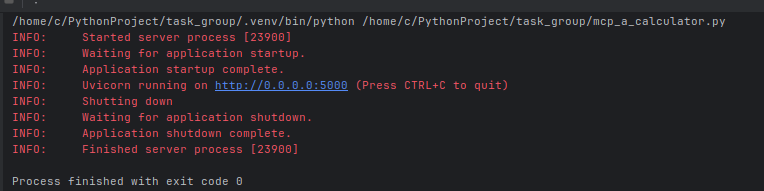
Note for simplicity sake we bound to 0.0.0.0:5000 which will bind to any address, for the above we gave it 192.168.1.3 - you will need to change it to whatever IP your server is.
Click the refresh button on the Llama.cpp MCP side, and make sure the tool is enabled it will look like the following:
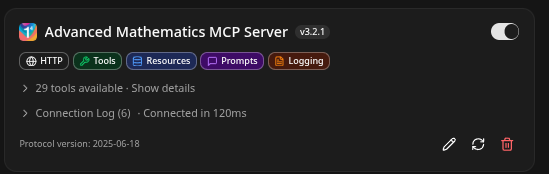
Of real interest is somehow the @mcp.tool wrapper has ingested the comment and used it to describe each function!
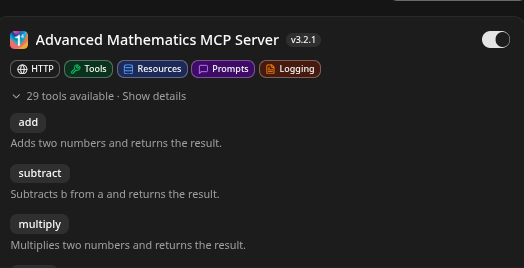
- Note the tool name is the same as the code above, and it has given it categorizations.
mcp = FastMCP(name="Advanced Mathematics MCP Server")Each individual function can simply be defined as - in this example we have defined the basic arithmetic:
# ── Basic Arithmetic ─────────────────────────────────────────────────────
@mcp.tool
def add(a: float, b: float) -> float:
    """Adds two numbers and returns the result."""
    return a + b

@mcp.tool
def subtract(a: float, b: float) -> float:
    """Subtracts b from a and returns the result."""
    return a - b

@mcp.tool
def multiply(a: float, b: float) -> float:
    """Multiplies two numbers and returns the result."""
    return a * b

@mcp.tool
def divide(a: float, b: float) -> float:
    """Divides a by b and returns the result. Raises ValueError on division by zero."""
    if b == 0:
        raise ValueError("Cannot divide by zero")
    return a / b
The format is pretty straigthtforward and you can expand it:
Testing your First MCP Tool, and Making your First Agentic Test!
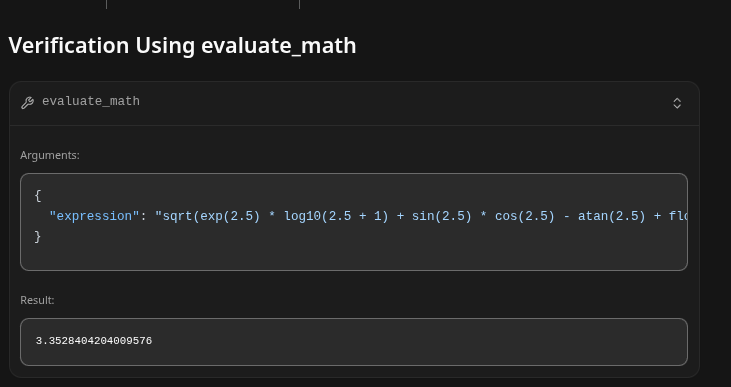
Create a complex equation and test it two times.
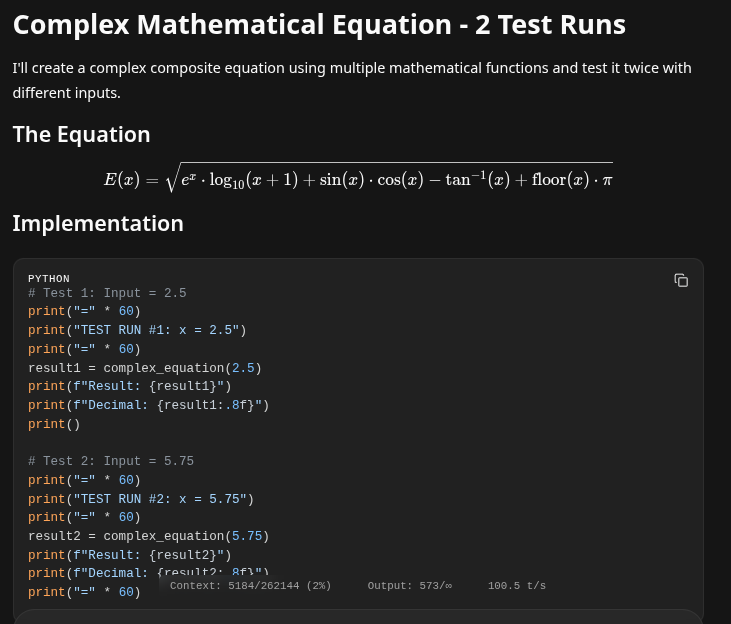
- Note it has created its own python function to test the equation, however it has no ability to do python (we will add that functionality next..)
- We can see that it will create an expression and test it. JSON is the format that it uses for its tools.
Summary
This shows the basic operation of creating a MCP tool that can be implemented by your LLM and managed by your Llama.cpp instance! If you are experienced in coding, you can quickly expand on this. This is incredibly powerful! Because we will be writing a pile of tools, naturally the next process is to start putting them into Docker Containers! A docker container compartmentalizes your software into their own small instances or 'containers' that keep them isolated and not clogging up your system!
