Agentic Server Primer: Llama.cpp MCP Lesson 3: Adding Python Tooling Capability To your HouseLLM.
Agentic Server Primer: Llama.cpp MCP Lesson 3: Python


In the previous two lessions we showed how to make a MCP calculator for your LLM, and then how to dockerize it so that it ran in it's own container. Dockerization now will become very important because you are literally going to let your LLM execute commands.
- Now we will build a python docker container so it can run it's own unit tests on the code that it writes!
If you need a primer on docker / python etc consider these two guides that explain it in detail:
 thinkmeltprotonmail.com
 thinkmeltprotonmail.com
Let's get started!
Make a file named mcp_b_python.py and put inside it:
import io
import traceback
import uvicorn
from contextlib import redirect_stdout, redirect_stderr
from starlette.middleware import Middleware
from starlette.middleware.cors import CORSMiddleware
from fastmcp import FastMCP

mcp = FastMCP(name="Python Testing Server")


# ── Python Code Execution ────────────────────────────────────────────────
@mcp.tool
def execute_python(code: str) -> str:
    """Executes Python code and returns the captured stdout, stderr, or any error traceback.

    This provides full Python interpreter support for testing and development.
    Code runs in an isolated namespace; the 'result' variable (if set) or prints are returned.
    """
    stdout_buffer = io.StringIO()
    stderr_buffer = io.StringIO()

    try:
        # Full builtins are enabled for complete Python support (suitable for testing)
        globals_dict = {"__builtins__": __builtins__}
        locals_dict = {}

        with redirect_stdout(stdout_buffer), redirect_stderr(stderr_buffer):
            exec(code, globals_dict, locals_dict)

        stdout = stdout_buffer.getvalue()
        stderr = stderr_buffer.getvalue()

        # Return any explicit 'result' variable if defined, otherwise stdout
        result = locals_dict.get("result")
        if result is not None:
            return f"{stdout}Result: {result}"
        if stderr:
            return f"Stderr:\n{stderr}\nStdout:\n{stdout}"
        return stdout.strip() or "Code executed successfully (no output)."

    except Exception:
        tb = traceback.format_exc()
        return f"Error executing code:\n{tb}"
    finally:
        stdout_buffer.close()
        stderr_buffer.close()


# ── Server Startup with CORS (required for llama.cpp frontend) ────────────
if __name__ == "__main__":
    middleware = [
        Middleware(
            CORSMiddleware,
            allow_origins=["*"],  # Restrict in production
            allow_credentials=True,
            allow_methods=["GET", "POST", "OPTIONS"],
            allow_headers=["*"],
            expose_headers=["*"],
        )
    ]

    app = mcp.http_app(
        path="/mcp",
        middleware=middleware
    )

    uvicorn.run(
        app,
        host="0.0.0.0",
        port=5001,
        log_level="info"
    )
At this point you can test it temporarily just be careful not to use anything delete related - it is executing commands in your system. So run the program, it will look something like this:
- Note we deliberately moved to port 5001 because the calculator in the previous guide was 5000.

When you specify the end point on the server it must have the /mcp url ending as:
http://192.168.1.3:5001/mcpIf you Llama.cpp detects and integrates it correctly it will look something like this:
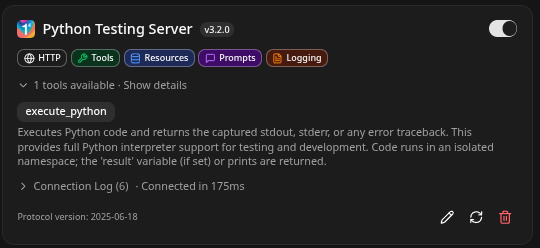
If you notice and click on the 1 tools available - it will be derived from the comments, and it runs inside an isolated namespace, next we test it:
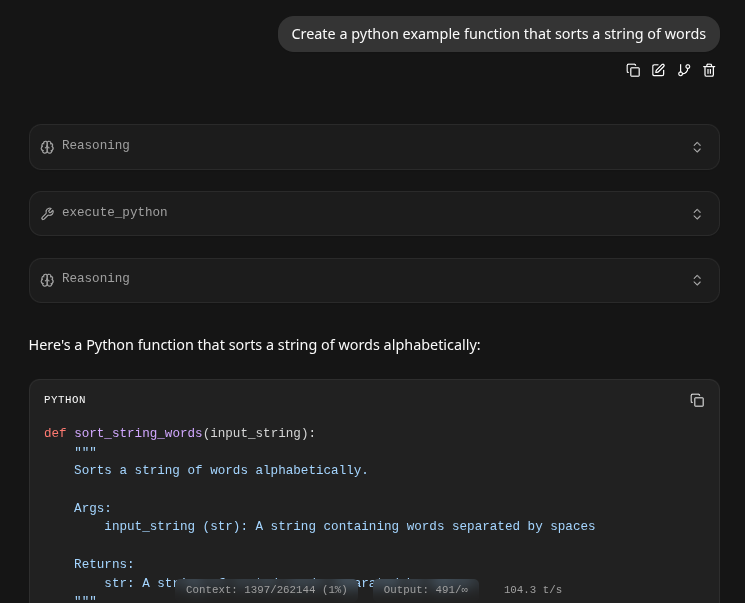
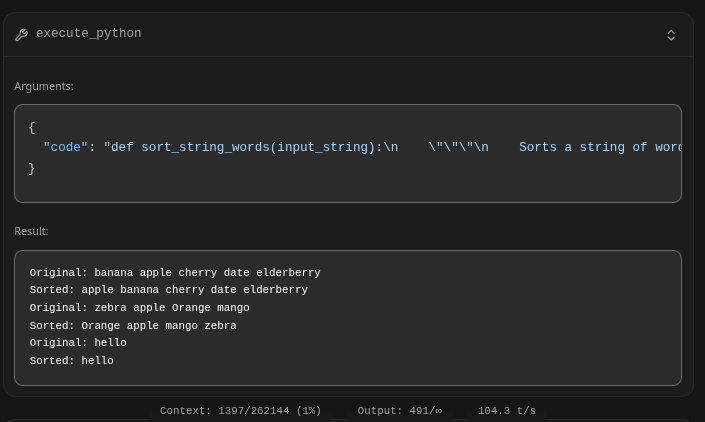
- The key is the 'execute_python' this is where it actually accessed the python tool and used it to test it's code: Examining it shows the sending JSON object and return result:
Dockerization
- Pretty much everything will need to be dockerized. So stop your mcp_b_python.py and put it in it's own directory.
- Add a file named Dockerfile and put into it:
FROM python:3.11-slim

# Set environment variables to prevent Python buffering
ENV PYTHONDONTWRITEBYTECODE=1
ENV PYTHONUNBUFFERED=1

# Set the working directory inside the container
WORKDIR /app

# Copy dependency file first for better caching
COPY requirements.txt .

# Install dependencies
RUN pip install --no-cache-dir -r requirements.txt

# Copy the rest of the application code
COPY . .

# Expose the port the app runs on
EXPOSE 5001

# Set the command to run the calculator script
# Ensure your script binds to 0.0.0.0, not 127.0.0.1
CMD ["python", "mcp_b_python.py"]
- Next make a requirements.txt and put into that:
# Example:
starlette
fastmcp
uvicorn
# Add other dependencies here
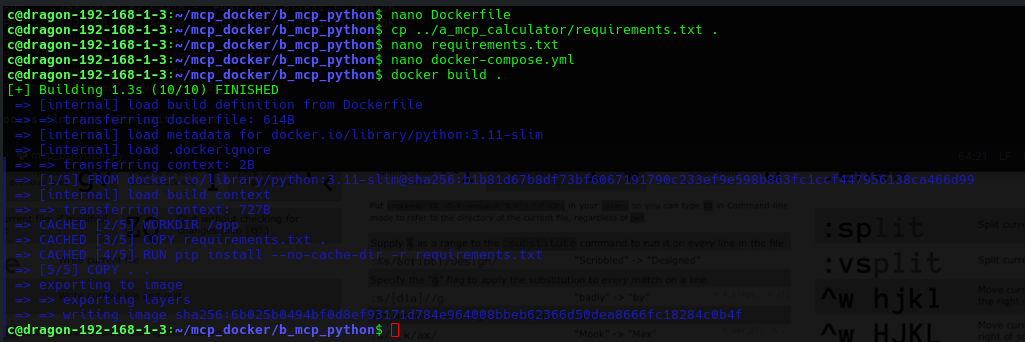
Now we will build the docker image, and it will look as the following if it works:
Finishing up with a docker-compose.yml file:
version: '3.8'

services:
  mcp_server:
    build: .
    ports:
      - "0.0.0.0:5001:5001"
    volumes:
      - .:/app                  # ← Enables live code changes without rebuild
    restart: unless-stopped
Which you can stand up temporarily with:
docker compose upIt should show up as:

Or permanently stand it up with:
docker compose up -dWe can now see two tools available to the LLM:
CONTAINER ID   IMAGE                         COMMAND                  CREATED          STATUS                    PORTS                                                    NAMES
6edd1f13cb21   a_mcp_calculator-mcp_server   "python mcp_a_calcul…"   5 seconds ago    Up 5 seconds              0.0.0.0:5000->5000/tcp                                   a_mcp_calculator-mcp_server-1
1ece6ea1e4e3   b_mcp_python-mcp_server       "python mcp_b_python…"   54 seconds ago   Up 53 seconds             0.0.0.0:5001->5001/tcp                                   b_mcp_python-mcp_server-1
Conclusion
We have added agentic tooling now for python! This is powerful, not only can it write it's own code - it can safely test it. The python tool is in it's own container, that keeps it safe in case the LLM hallucinates or does whatever..
